EducationSoftwareStrategy.com
StrategyCommunity

Knowledge Base

Product

Community

Knowledge Base

TopicsBrowse ArticlesDeveloper Zone

Product

Download SoftwareProduct DocumentationSecurity Hub

Education

Tutorial VideosSolution GalleryEducation courses

Community

GuidelinesGrandmastersEvents
x_social-icon_white.svglinkedin_social-icon_white.svg
Strategy logoCommunity

© Strategy Inc. All Rights Reserved.

LegalTerms of UsePrivacy Policy
  1. Home
  2. Topics

KB38377: "[MicroStrategy][ODBC DB2 Wire Protocol driver]Remote Database Not Found:" error message appears when creating a DSN in MicroStrategy 9.4.x against DB2 iSeries database


Community Admin

• Strategy


"[MicroStrategy][ODBC DB2 Wire Protocol driver]Remote Database Not Found:" error message appears when creating a DSN in MicroStrategy 9.4.x against DB2 iSeries database

SYMPTOM:
When using Strategy Connectivity Wizard an error occurs as shown in the image below:
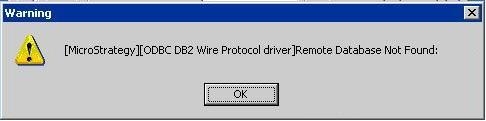
ka04W000000OegkQAC_0EM440000002JGS.jpeg

Sample Code/Error
Remote Database Not Found:
CAUSE:
A connection was established between the two machines but the Location (Database) is incorrect.
ACTION:
Contact the Database Administrator to get the correct Database name.
Note: File based cannot be used only database can.


Comment

0 comments

Details

Knowledge Article

Published:

June 7, 2017

Last Updated:

June 7, 2017