EducationSoftwareStrategy.com
StrategyCommunity

Knowledge Base

Product

Community

Knowledge Base

TopicsBrowse ArticlesDeveloper Zone

Product

Download SoftwareProduct DocumentationSecurity Hub

Education

Tutorial VideosSolution GalleryEducation courses

Community

GuidelinesGrandmastersEvents
x_social-icon_white.svglinkedin_social-icon_white.svg
Strategy logoCommunity

© Strategy Inc. All Rights Reserved.

LegalTerms of UsePrivacy Policy
  1. Home
  2. Topics

KB38389: The Edit links feature set on a dynamic textbox to answer two or more prompts dynamically will fail from Flash mode in MicroStrategy Web


Community Admin

• Strategy


The Edit links feature set on a dynamic textbox to answer two or more prompts dynamically will fail from Flash mode in MicroStrategy Web.

SYMPTOM
Users try to use the Edit links feature to pass selector options from one document to another through a textbox that answers prompts dynamically. This works correctly when only one selector value is being passed, both from DHTML and Flash modes. However, if two or more selector values are passed through the same dynamic textbox, it will only work in DHTML but not Flash mode, in Strategy Web 9.x. The behavior is described below.
 
From DHTML mode.  South and Music are passed to the Report Filter:

ka04W000000OgGPQA0_0EM4400000027Nl.jpeg

 
From Flash mode.  Notice that even though Sout and Music and selected, only Music is passed and the prompt is displayed to answer Region:
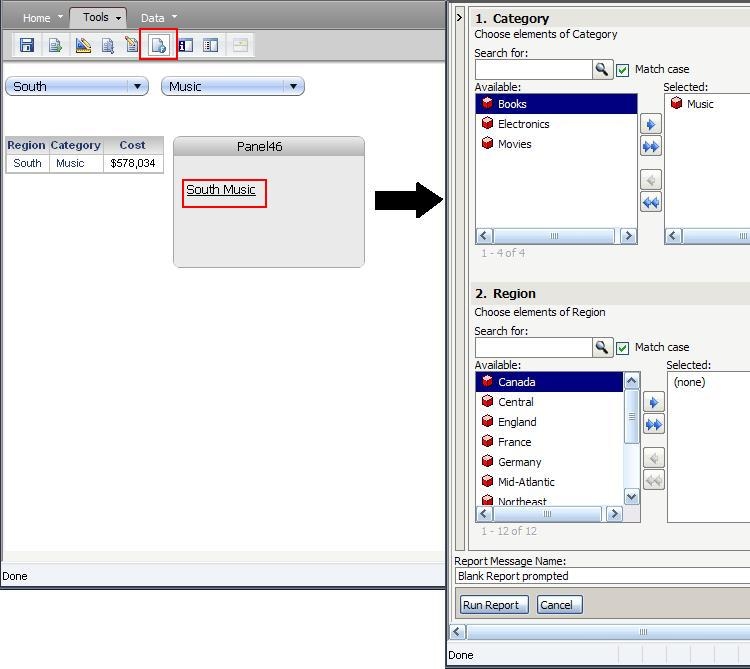
ka04W000000OgGPQA0_0EM4400000027Nr.jpeg


STEPS TO REPRODUCE
Follow these steps to reproduce the issue.

  1. Create a report with Region, Category, and a metric.
  2. Duplicate this report and add element prompts on Region and Category.
  3. Convert the static report into document.
  4. Add a panel stack.
  5. Place a dynamic text field with both Category and Region inside the panel stack (only 1 textbox).
  6. Add a selector on Category and another one on Region to target the panel stack.
  7. Use the Edit links feature on the textbox to run the prompted report.
  8. Set both prompts to be answered dynamically.
  9. Save and run.
  10. Test in DHTML mode, both prompts are answered.
  11. Test in Flash mode. Only the first prompt in the target report is answered.

CAUSE
This is a known issue with Strategy Web 9.x.
 
ACTION
Contact Strategy Technical Support for an update on this issue.


Comment

0 comments

Details

Knowledge Article

Published:

June 16, 2017

Last Updated:

June 16, 2017