EducationSoftwareStrategy.com
StrategyCommunity

Knowledge Base

Product

Community

Knowledge Base

TopicsBrowse ArticlesDeveloper Zone

Product

Download SoftwareProduct DocumentationSecurity Hub

Education

Tutorial VideosSolution GalleryEducation courses

Community

GuidelinesGrandmastersEvents
x_social-icon_white.svglinkedin_social-icon_white.svg
Strategy logoCommunity

© Strategy Inc. All Rights Reserved.

LegalTerms of UsePrivacy Policy
  1. Home
  2. Topics

KB38390: When sending a text file with Narrowcast Server, not all headers from the report are included in Narrowcast Server 9.4.x-10.x.


Community Admin

• Strategy


This knowledge base article explains why at times when sending a text file with Narrowcast Server, not all headers from the report are included in Narrowcast Server 9.4.x-10.x

SYMPTOM:
When sending a text file with Narrowcast Server 9.4.x-10.x, not all header content from the report are included.
 
STEPS TO REPRODUCE:
Follow the steps below to reproduce the issue with Strategy Tutorial project:
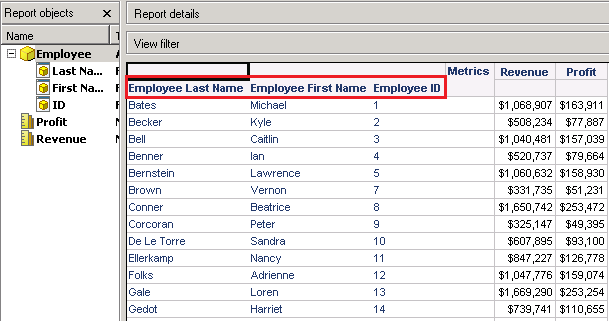
  • Create a report in Strategy Developer with 1 or 2 attributes showing both ID and DESC forms for each one. Make sure the 'Long Names' grid option is enabled to see separate headers for each attribute form and not just the attribute name. The report result is shown as below:
     
ka04W000000Ogh6QAC_0EM4400000029xC.png
  • Create a service in Narrowcast attaching this report as an Information Object within a plain text attachment.
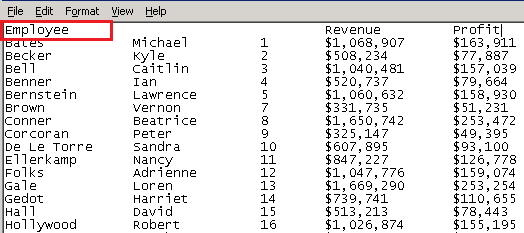
  • No available plain text template will keep the Long Name headers from each form, it will just show the name of the attribute as the header, as the image shown below:
     
ka04W000000Ogh6QAC_0EM4400000029xG.png
  • However if the report is exported to plain text directly from Strategy Desktop, the text file shows the long name header correctly.

CAUSE:
Long name plain text template not being used.
 
ACTION:
Use a different XSl: MSTR7ToText-LongNames.xsl, which can be used to display Long name for plain text format, located at ..\Program Files\MicroStrategy\Narrowcast Server\Delivery Engine\XSL\TextDocuments. 
MSTR7ToText-LongNames.xsl hasn't been imported to Narrowcast Administrator 9.4.x-10.x by default, it needs to be imported manually.
The following is the correct export result:
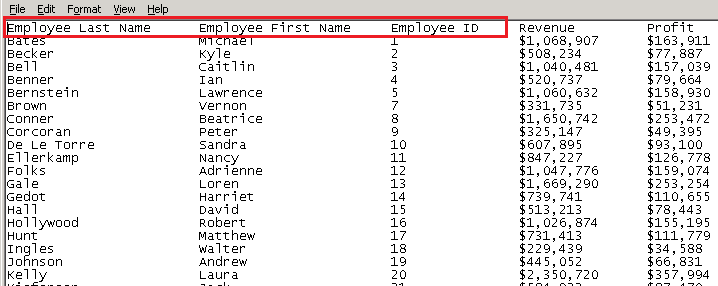
ka04W000000Ogh6QAC_0EM4400000029xJ.png

 
Please refer to the tech note KB32049 on how to export a report in Excel and HTML format with long name in Narrowcast 9.4.x-10.x.


Comment

0 comments

Details

Knowledge Article

Published:

June 12, 2017

Last Updated:

June 12, 2017