EducationSoftwareStrategy.com
StrategyCommunity

Knowledge Base

Product

Community

Knowledge Base

TopicsBrowse ArticlesDeveloper Zone

Product

Download SoftwareProduct DocumentationSecurity Hub

Education

Tutorial VideosSolution GalleryEducation courses

Community

GuidelinesGrandmastersEvents
x_social-icon_white.svglinkedin_social-icon_white.svg
Strategy logoCommunity

© Strategy Inc. All Rights Reserved.

LegalTerms of UsePrivacy Policy
  1. Home
  2. Topics

KB38398: How to load subscription cache automatically on iPad/iPhone using MicroStrategy Mobile 9.2.1 and above?


Community Admin

• Strategy


In MicroStrategy Web 9.2.1 and above, it is available to load subscription automatically instead of executing reports and Report Services documents in advance. When MicroStrategy Mobile App is launched and connected to mobile server, subscription caches are loaded automatically

In Strategy Web 9.2.1 and above, it is available to load subscription automatically instead of executing reports and Report Services documents in advance. When Strategy Mobile App is launched and connected to mobile server, subscription caches are loaded automatically, as shown below:
9.2.1 to 9.3.x:

ka04W000000OddVQAS_0EM440000002AMk.jpeg

9.4.x, 9.5.x and 10.x:
 

ka04W000000OddVQAS_0EM440000002IzI.png

 
Note that the small icon at the left bottom corner in document list.
 
The following steps show how to implement this function:
  • Open Strategy Mobile Admin page.
  • In Mobile configuration, define a new configuration.
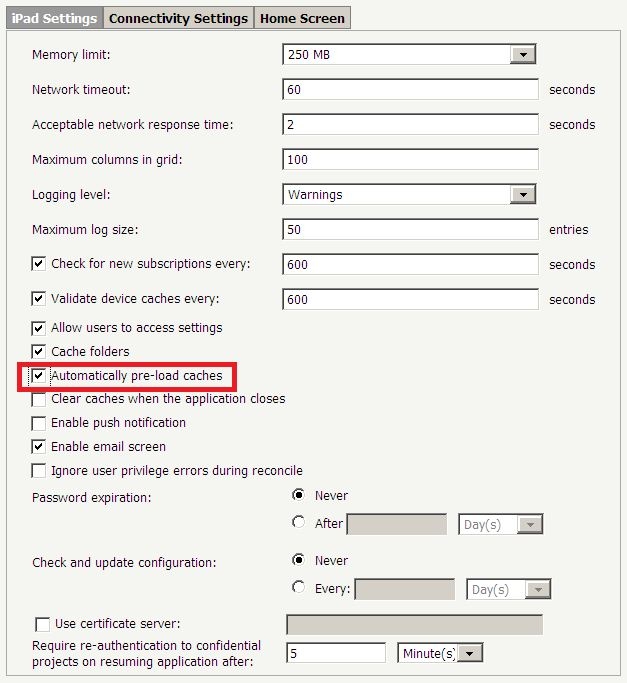
  • Go to iPad Settings tab, check "Automatically pre-load caches" for 9.2.1 to 9.3.x ("Automatically pre-load subscriptions" for 9.4.x, 9.5.x and 10.x), as shown below:
    9.2.1 to 9.3.x:
ka04W000000OddVQAS_0EM440000002AMp.jpeg
  •  
    9.4.x, 9.5.x and 10.x:
     
ka04W000000OddVQAS_0EM440000002IzN.png
  • Complete the remaining settings for mobile configuration and generate configuration URL, as shown below:
     
ka04W000000OddVQAS_0EM440000002AMn.jpeg
  • Open this URL in Safari browser on iPad.
  • After a while, the subscribed reports and report service documents are automatically loaded without execution.

These subscription can be read in off-line mode. This pre-load can only be configured in configuration URL but not in Mobile App setting.


Comment

0 comments

Details

Knowledge Article

Published:

April 10, 2017

Last Updated:

April 10, 2017