EducationSoftwareStrategy.com
StrategyCommunity

Knowledge Base

Product

Community

Knowledge Base

TopicsBrowse ArticlesDeveloper Zone

Product

Download SoftwareProduct DocumentationSecurity Hub

Education

Tutorial VideosSolution GalleryEducation courses

Community

GuidelinesGrandmastersEvents
x_social-icon_white.svglinkedin_social-icon_white.svg
Strategy logoCommunity

© Strategy Inc. All Rights Reserved.

LegalTerms of UsePrivacy Policy
  1. Home
  2. Topics

KB38409: How to drill to a template from a metric value with the filter condition inherited in MicroStrategy Reporter (formely Desktop) 9.x and 10.x


Community Admin

• Strategy


Article outlines how to drill from a metric value to a template with the new report inheriting the filtering conditions form the parent report.

In some business scenarios, it is required to drill from a metric value to a template and the new report should inherit the filtering condition from the parent report. For example, drill on the Revenue value of the Year=2008 and Category=Books and the new report should display the data within 2008 and Books.
 
EXAMPLE:

  • Create a report with "Year", "Region" and "Revenue"
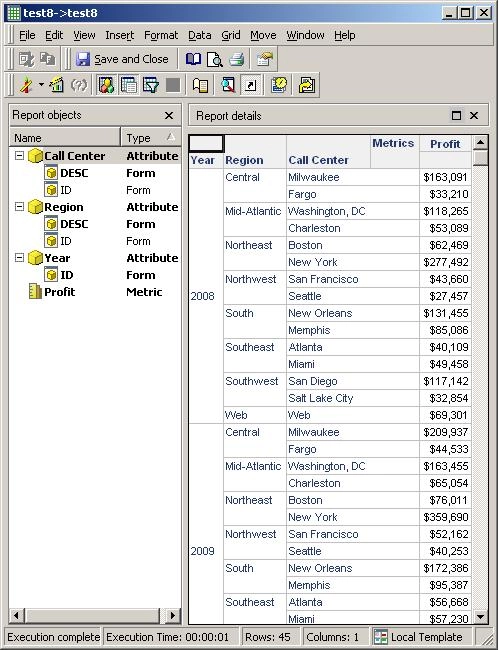
  • Create a template with "Year", "Region", "Call Center" and "Profit"
  • If modify the drill map as below. Choose Metric to add a template drill path.
     
ka04W000000OhVvQAK_0EM440000002HPl.jpeg
  • Run the report and only can drill to the template by right click the header of the metric
     
ka04W000000OhVvQAK_0EM440000002HPi.jpeg
  • The new report does not inherit any filtering condition from the original report.
     
ka04W000000OhVvQAK_0EM440000002HPk.jpeg
  • If in the step 3 do not set the template on the metric, set the template on the "Local Template". Change the setting as below:
     
ka04W000000OhVvQAK_0EM440000002HPg.jpeg
  • Save and close and run the report again. The metric value can be drilled.
     
ka04W000000OhVvQAK_0EM440000002HPf.jpeg
  • The new report will inherit the condition from where drilled. Like the example above, from "Northwest" and "2008", the result is shown as below.
     
ka04W000000OhVvQAK_0EM440000002HPB.jpeg


Comment

0 comments

Details

Knowledge Article

Published:

May 17, 2017

Last Updated:

May 17, 2017