EducationSoftwareStrategy.com
StrategyCommunity

Knowledge Base

Product

Community

Knowledge Base

TopicsBrowse ArticlesDeveloper Zone

Product

Download SoftwareProduct DocumentationSecurity Hub

Education

Tutorial VideosSolution GalleryEducation courses

Community

GuidelinesGrandmastersEvents
x_social-icon_white.svglinkedin_social-icon_white.svg
Strategy logoCommunity

© Strategy Inc. All Rights Reserved.

LegalTerms of UsePrivacy Policy
  1. Home
  2. Topics

KB38414: Prompt answers cannot be displayed as filter detail when do file subscription in Microstrategy Distribution Services 9.0.x


Community Admin

• Strategy


SYMPTOM:
 
Prompt answers cannot be displayed as filter detail when do file subscription to Excel format in Strategy Distribution Services 9.0.x.
 
STEPS TO REPRODUCE: 
 

  1. Create a report with attribute Subcategory and metric Cost. Add an element prompt based on Category attribute. The report is shown as below in Web:
ka04W000000OeLhQAK_0EM4400000029x0.jpeg


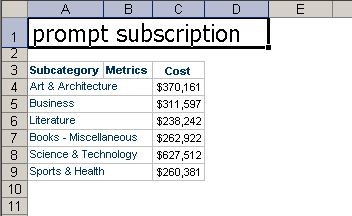
  • Send this report to File subscription as Excel format. Open the report in Excel, as shown below:
ka04W000000OeLhQAK_0EM4400000029x4.jpeg

 
Note: the filter detail does not exist in the Excel file.
 
 
CAUSE:
 
This is a known issue in Strategy Distribution Services 9.0.x.
 
ACTION:
 
This issue has been addressed in Strategy Distribution Services 9.2.1. Upgrade to this version and follow up below steps to take advantage of this fix. 
 

  1. Go to Preferences->Project Defaults->Export Reports, check the option of "Use header and footer when delivering subscriptions" as shown below:
ka04W000000OeLhQAK_0EM4400000029x2.png


  • Go to Preference->User Preferences->Export Reports, check the option of "Export filter details" as shown below:
ka04W000000OeLhQAK_0EM4400000029wz.jpeg


  • Restart Intelligence server or wait for some time to synchronize the settings.
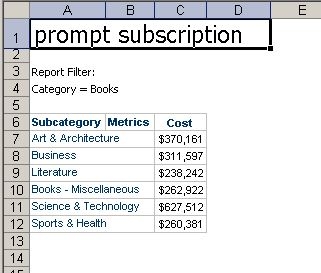
  • After the file subscription, run the report in Excel which shows as below:
ka04W000000OeLhQAK_0EM4400000029x1.jpeg


Comment

0 comments

Details

Knowledge Article

Published:

June 12, 2017

Last Updated:

June 12, 2017