EducationSoftwareStrategy.com
StrategyCommunity

Knowledge Base

Product

Community

Knowledge Base

TopicsBrowse ArticlesDeveloper Zone

Product

Download SoftwareProduct DocumentationSecurity Hub

Education

Tutorial VideosSolution GalleryEducation courses

Community

GuidelinesGrandmastersEvents
x_social-icon_white.svglinkedin_social-icon_white.svg
Strategy logoCommunity

© Strategy Inc. All Rights Reserved.

LegalTerms of UsePrivacy Policy
  1. Home
  2. Topics

KB38448: How to automatically trigger reports to execute after Intelligent Cubes are published or refreshed in MicroStrategy 9.x or 10.x using Command Manager


Community Admin

• Strategy


How to automatically trigger reports to execute after Intelligent Cubes are published or refreshed in MicroStrategy 9.x or 10.x using Command Manager

By default, Strategy Command Manager handles cube publication synchronously (i.e. for a script with several commands, one of which being a cube publication command, the subsequent commands will not be executed until the cube publication command has completed).  Thus, it is possible to create a Command Manager script that will trigger an event-based schedule after a cube has completed publishing.

ka04W000000OhcXQAS_0EM4400000029xd.jpeg

 
Example:
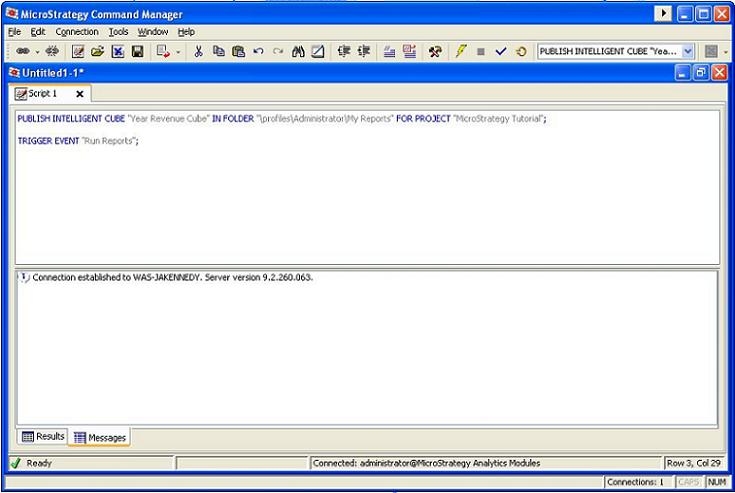
Below is an example of a script that can be used to execute the event "Run Reports" after Intelligent Cube "Year Revenue Cube" has published.
ka04W000000OhcXQAS_0EM4400000029xb.jpeg


PUBLISH INTELLIGENT CUBE "Year Revenue Cube" IN FOLDER "\profiles\Administrator\My Reports" FOR PROJECT "Strategy Tutorial"; 
TRIGGER EVENT "Run Reports";


Comment

0 comments

Details

Knowledge Article

Published:

May 8, 2017

Last Updated:

May 8, 2017