EducationSoftwareStrategy.com
StrategyCommunity

Knowledge Base

Product

Community

Knowledge Base

TopicsBrowse ArticlesDeveloper Zone

Product

Download SoftwareProduct DocumentationSecurity Hub

Education

Tutorial VideosSolution GalleryEducation courses

Community

GuidelinesGrandmastersEvents
x_social-icon_white.svglinkedin_social-icon_white.svg
Strategy logoCommunity

© Strategy Inc. All Rights Reserved.

LegalTerms of UsePrivacy Policy
  1. Home
  2. Topics

KB38454: "Error: SQL Generation Complete Maximum number of result rows retrieved per report was exceeded." error message appears when running a report in MicroStrategy Developer 9.4.x - 10.x.


Stefan Zepeda

Salesforce Solutions Architect • Strategy


This technical note documents an issue that occurs when running a report, that can be reverted by modifying the project governing settings.

SYMPTOM:
When running a report in Strategy Developer 9.4.x - 10.x.an error occurs as shown in the image below.

ka02R000000kcSQQAY_0EM440000002DTI.jpeg


Report: 24 rows

Job: 203

Status: Execution failed

Error: SQL Generation Complete
Maximum number of result rows retrieved per report was exceeded.
Error in Process method of Component: QueryEngineServer, Project Strategy 
Tutorial, Job 203, Error Code= -2147205488.

Starting Time: 15:03:07
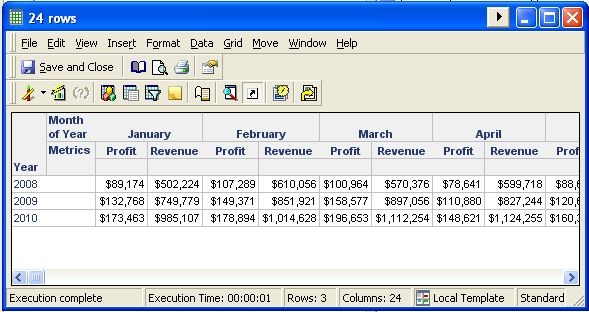
 
 
When the desired results are less than 3 rows as shown in the image below:

ka02R000000kcSQQAY_0EM440000002DTD.jpeg

 
CAUSE:
Strategy considers a row when no cross tabbing is used as shown in the image below. Metrics are excluded since they are row level data.

ka02R000000kcSQQAY_0EM440000002DTF.jpeg

 
ACTION:
Increase the project governing settings to match or exceed the report without cross tabs as shown in the image below.

ka02R000000kcSQQAY_0EM440000002DTG.jpeg


Comment

0 comments

Details

Knowledge Article

Published:

April 19, 2017

Last Updated:

April 19, 2017