EducationSoftwareStrategy.com
StrategyCommunity

Knowledge Base

Product

Community

Knowledge Base

TopicsBrowse ArticlesDeveloper Zone

Product

Download SoftwareProduct DocumentationSecurity Hub

Education

Tutorial VideosSolution GalleryEducation courses

Community

GuidelinesGrandmastersEvents
x_social-icon_white.svglinkedin_social-icon_white.svg
Strategy logoCommunity

© Strategy Inc. All Rights Reserved.

LegalTerms of UsePrivacy Policy
  1. Home
  2. Topics

KB38460: How to create an attribute form to control the sorting of an attribute using metric values using a datamart report in MicroStrategy Developer 9.X


Stefan Zepeda

Salesforce Solutions Architect • Strategy


In certain situations, it might be required to sort an attribute based on the value of a different metric or function. The steps below, explain how to achieve this in MicroStrategy Developer 9.x.

In certain situations, it might be required to sort  an attribute based on the value of a different metric or function. The steps below, explain how to achieve this in Strategy Developer 9.x.
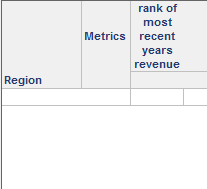
  • Create a datamart with the attribute that needs to be sorted  and a sequential metric that orders the attribute as desired. In this example the sorting of region will always be done by a rank of the most recent revenue that the region has.
     
ka02R000000kXJFQA2_0EM440000002DRD.png
  • Publish the datamart report.
  • Import the datamart by using Warehouse Catalog into the project.
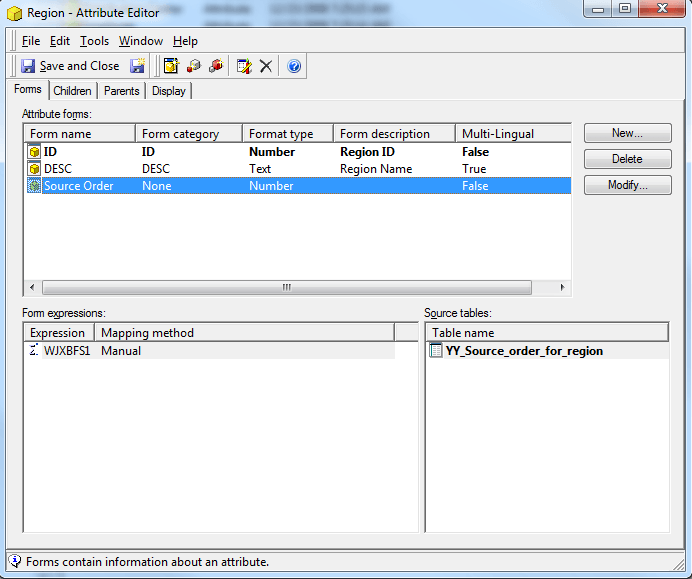
  • Ensure that the new table is used in the ID of the attribute you would like to sort and add a new attribute form based off the metric from the datamart.
     
ka02R000000kXJFQA2_0EM440000002DRG.png
  • Remove the source order from the report display forms in the Attribute Editor.
  • Update the Schema of the project
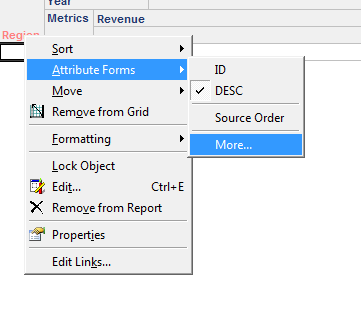
  • Right click on the attribute in the report that you would like to sort and add more forms to the report objects forms.
ka02R000000kXJFQA2_0EM440000002DRE.png
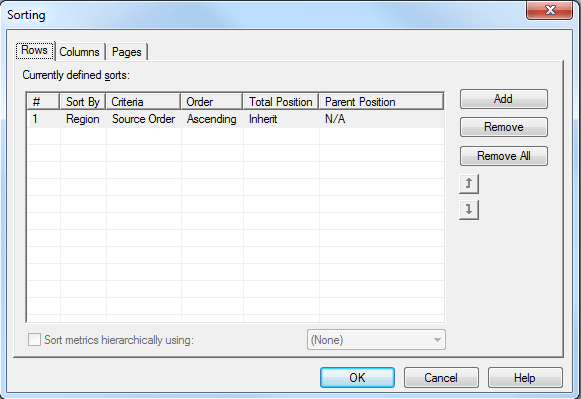
  • Go to the advanced sorting in the report and add the source order as the criteria to be used when sorting the attribute as shown in the image below:
     
ka02R000000kXJFQA2_0EM440000002DRI.png

 
Note: It is often advantageous to schedule the datamart to be updated on a repeating basis depending on usage need.


Comment

0 comments

Details

Knowledge Article

Published:

June 19, 2017

Last Updated:

June 19, 2017