EducationSoftwareStrategy.com
StrategyCommunity

Knowledge Base

Product

Community

Knowledge Base

TopicsBrowse ArticlesDeveloper Zone

Product

Download SoftwareProduct DocumentationSecurity Hub

Education

Tutorial VideosSolution GalleryEducation courses

Community

GuidelinesGrandmastersEvents
x_social-icon_white.svglinkedin_social-icon_white.svg
Strategy logoCommunity

© Strategy Inc. All Rights Reserved.

LegalTerms of UsePrivacy Policy
  1. Home
  2. Topics

KB38474: "Syntax error (missing operator) in query expression 'N'Dummy Name''" error message appears when logging into a 2-tier project source in MicroStrategy Developer 9.4.1 and 10.x.


Stefan Zepeda

Salesforce Solutions Architect • Strategy


In MicroStrategy Developer 9.4.1 and 10.x, when a user logs in a 2-tier project connecting to a Microsoft Access Database, Database error <>: Execute Query failed. Error type: Odbc error. Odbc operation attempted: SQLExecDirect. Syntax error (missing operator) in query expression 'N'Dummy Name''.

SYMPTOM:
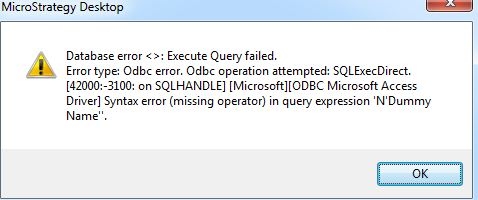
In Strategy Developer 9.4.1 and 10.x, when a user logs in a 2-tier project connecting to a Microsoft Access Database, the following error occurs:
 

ka02R000000kXXWQA2_0EM440000002DSC.jpeg


Database error <>: Execute Query failed.

Error type: Odbc error. Odbc operation attempted: SQLExecDirect. Syntax error (missing operator) in query expression 'N'Dummy Name''.

 
CAUSE:
This is due to the Access metadata was created through Microsoft SQL Server export function. To verify the problem, please run the SQL below:

SELECT * FROM DSSMDSYSPROP;

If the RDBMS is not "ACCESS...", then this problem occurs.
 
ACTION:
The correct way to move Strategy projects from SQL Server to Access is through Project Duplication. By using SQL Server Export feature, some parameters in the metadata are not configured properly.


Comment

0 comments

Details

Knowledge Article

Published:

June 14, 2017

Last Updated:

June 14, 2017