SYMPTOM:
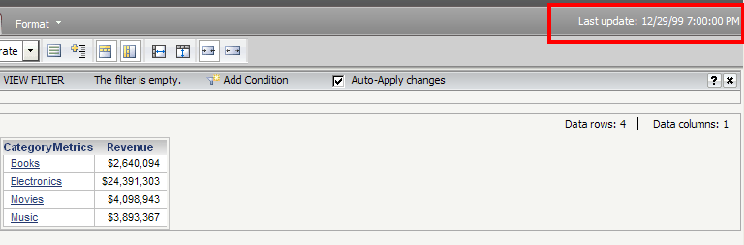
After updating an intelligent cube through incremental refresh, when running a report based off the cube, the incorrect time (12/29/99 7:00:00 PM) appears as the last update time in Strategy Web 9.4.1.
STEPS TO REPRODUCE:
1. In Desktop, create and publish an intelligent cube with one attribute and one metric.
2. Define an incremental refresh report off of the intelligent cube from the right mouse click context menu.
3. Create a report off of the original intelligent cube.
4. Run the incremental refresh report and the accurate update time will show in the intelligent cube cache monitor.
5. In Web, run the report that was created off of the intelligent cube and the incorrect time (12/29/99 7:00:00 PM) appears as the last update time.
CAUSE:
This is a known issue with Strategy Web 9.4.1.
ACTION:
Contact Strategy Technical Support for an update on this issue.
