SYMPTOM:
When a user runs an ESRI map custom visualization based on latitude and longitude, the message "No mappable attributes present on the report" pops up, but the user can still see the markers for representing the latitude and longitude attribute.
STEPS TO REPRODUCE:
1. Create an ESRI map custom visualization.
2. Run the ESRI map and the "No mappable attributes present on the report" message pops up.

Sample Code/Error
No mappable attributes present on the report
CAUSE:
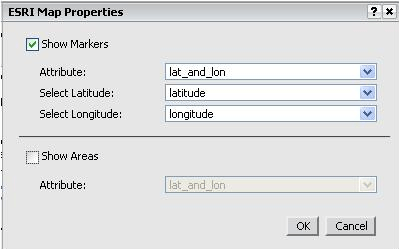
In the ESRI map properties, the "show area" check box is selected. The map is looking for an area attribute to map, as in "region" or "state" but the same latitude/longitude attribute is attempted to being used.
ACTION:
Open the ESRI map visual editor and uncheck the "show area" box.
KB38493
