EducationSoftwareStrategy.com
StrategyCommunity

Knowledge Base

Product

Community

Knowledge Base

TopicsBrowse ArticlesDeveloper Zone

Product

Download SoftwareProduct DocumentationSecurity Hub

Education

Tutorial VideosSolution GalleryEducation courses

Community

GuidelinesGrandmastersEvents
x_social-icon_white.svglinkedin_social-icon_white.svg
Strategy logoCommunity

© Strategy Inc. All Rights Reserved.

LegalTerms of UsePrivacy Policy
  1. Home
  2. Topics

KB38516: Conditional formatting does not work on a Text Box in MicroStrategy Web 9.x


Community Admin

• Strategy


conditional formatting does not work if the condition = 'metric is NULL'; conditional formatting does not work in express mode , if action= 'hide',

SYMPTOM
Conditional formatting does not work on a Text Box object placed in a Report Services document in Strategy Web for some conditions:

  1. conditional formatting does not work if the condition = 'metric is NULL'
  2. conditional formatting does not work in express mode , if action= 'hide'

STEPS TO REPRODUCE

  • In a dashboard, create a panel stack object.
  • Add a text box, dynamic or static, and a grid or graph to this panel stack.
  • Create a selector choice so there will be no data for the grid/graph.
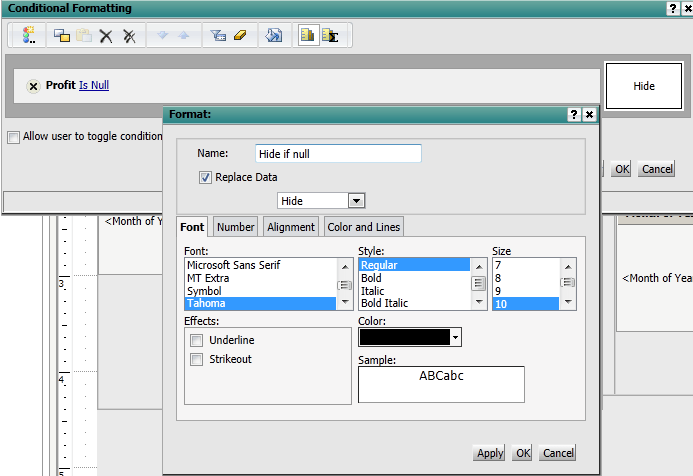
  • Create a threshold on the text box whose conditional action is to hide if some of the data in the grid/graph is null.

ka04W000000OfVfQAK_0EM4400000027Mt.png

 
      5. When the document is run, the text box will not be hidden.  Notice the "test" text above the grid.
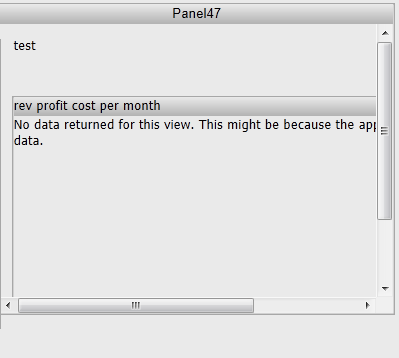
 

ka04W000000OfVfQAK_0EM4400000027Ms.png

 
CAUSE
This is a known issue in Strategy Web 9.2.1.
This issue has been fixed in Strategy Web 9.4.1 Hotfix2, take advantage of upgrading for a fix. 


Comment

0 comments

Details

Knowledge Article

Published:

April 3, 2017

Last Updated:

April 3, 2017