EducationSoftwareStrategy.com
StrategyCommunity

Knowledge Base

Product

Community

Knowledge Base

TopicsBrowse ArticlesDeveloper Zone

Product

Download SoftwareProduct DocumentationSecurity Hub

Education

Tutorial VideosSolution GalleryEducation courses

Community

GuidelinesGrandmastersEvents
x_social-icon_white.svglinkedin_social-icon_white.svg
Strategy logoCommunity

© Strategy Inc. All Rights Reserved.

LegalTerms of UsePrivacy Policy
  1. Home
  2. Topics

KB3857: How to use the Bursting feature in MicroStrategy Distribution Services 9.3.x and above.


Community Admin

• Strategy


How to use the Bursting feature in MicroStrategy

Bursting is a feature introduced in Strategy Distribution Services 9.3.0 that generates page-by slices and stores results to separate files via a subscription.
 
Reports and Report Services Documents can use the bursting feature if they contain page-bys, and files produced with bursting can use variables to generate unique, individual file names.
  • Choose a suitable Report or Report Services Document and create a new subscription
  • Under the "File" heading, select "Add file subscription"
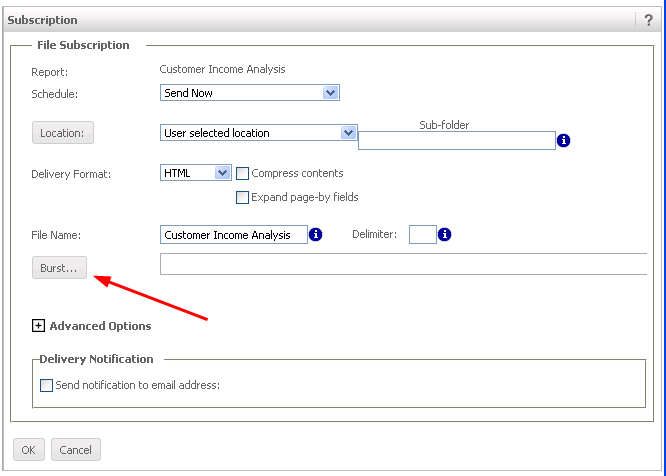
  • Directly under "File Name" click the button labeled "Burst..."
ka04W000000OabCQAS_0EM4400000026zy.png
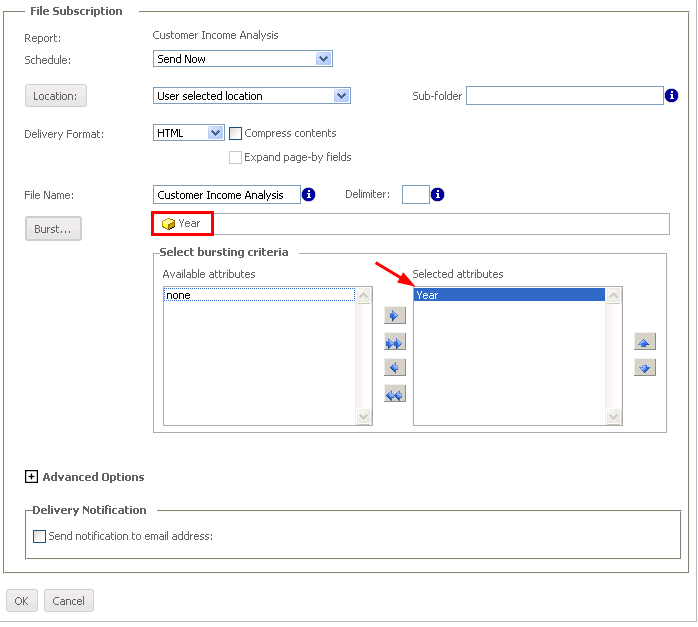
  • The selector boxes will show the Page-By attributes in the left box.  Move attribute from the "Available" box to the "Selected" box to burst according to those attributes.  Selected Attributes will show in the bar above the selector
ka04W000000OabCQAS_0EM4400000026zm.png
  • The file name can be defined in the File Name blank using the following variables:
      • Bursting Attribute: {[Attribute Name]@[Attribute Form]}
      • Date: %%Date%% or {&Date}
      • Time: %%Time%% or {&Time}
      • Recipient Name: %%RecipientName%% or {&RecipientName}
      • User Login: {&UserLogin}
      • Subscription Name: {&Subscription}
      • Project Name: {&Project}
      • Prompt N: {&Prompt#&}
      • Content Name: {&ContentName}
      • Content Details: {&ContentDetails}
  • After filling in the remaining required File Subscription options, click OK to accept these options

Article Reference Number: 
KB3857


Comment

0 comments

Details

Knowledge Article

Published:

March 29, 2017

Last Updated:

January 1, 2019