EducationSoftwareStrategy.com
StrategyCommunity

Knowledge Base

Product

Community

Knowledge Base

TopicsBrowse ArticlesDeveloper Zone

Product

Download SoftwareProduct DocumentationSecurity Hub

Education

Tutorial VideosSolution GalleryEducation courses

Community

GuidelinesGrandmastersEvents
x_social-icon_white.svglinkedin_social-icon_white.svg
Strategy logoCommunity

© Strategy Inc. All Rights Reserved.

LegalTerms of UsePrivacy Policy
  1. Home
  2. Topics

KB38590: "Cannot find object with ID '[Object GUID]' and supported types in Metadata" error message appears when using Metadata Slice Collector in MicroStrategy Health Center 9.x.


Community Admin

• Strategy


When using Metadata Slice Collector in MicroStrategy Health Center 9.x, the following error message appears: "Cannot find object with ID '[Object GUID]' and supported types in Metadata".

SYMPTOM:
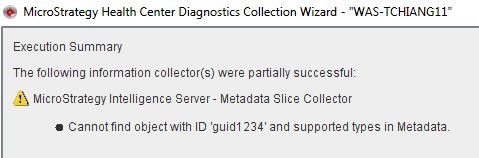
When the user runs Metadata Slice Collector in Strategy Health Center 9.x, the following error occurs:
 

ka04W000000OfkEQAS_0EM4400000029wF.jpeg


Cannot find object with ID '' and supported types in Metadata
  
CAUSE:
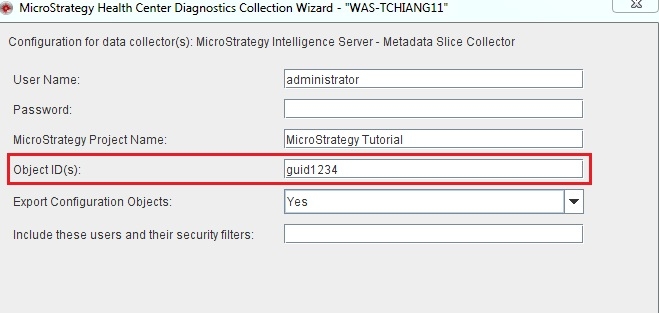
This error is caused by one of the report GUID(s) input by the user cannot be found in the metadata. See the screen shot below:
 

ka04W000000OfkEQAS_0EM4400000029w7.jpeg

 
In this example, "guid1234" cannot be found in the project "Strategy Tutorial".
 
ACTION:
This behavior is expected. Please ensure all report GUID(s) exist in the project.


Comment

0 comments

Details

Knowledge Article

Published:

June 9, 2017

Last Updated:

February 28, 2018