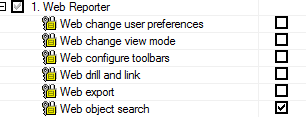
SYMPTOM:
A Web User may be granted the Create Schema Objects privilege directly from the user definition, inherited from a user group or security role, or automatically assigned with another privilege such as "Web Import Data" under Web Professionals. For example, the Web user in question may have a set of Common Privileges similar to below:
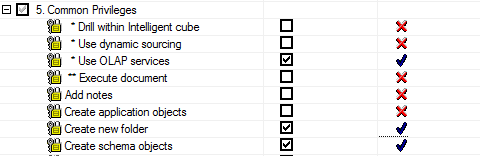
In this scenario, the Create Schema Objects privilege, in conjunction with Create New Folder, allows the user to copy/paste objects for which they only have View permissions. For instance, although the user above has only View access to the folders within Schema Objects, they are able to search for these folders and copy them and their contents into My Reports, Shared Reports, or My Objects.
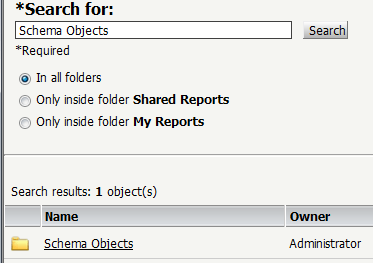
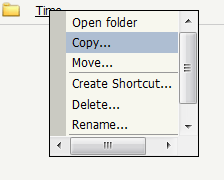
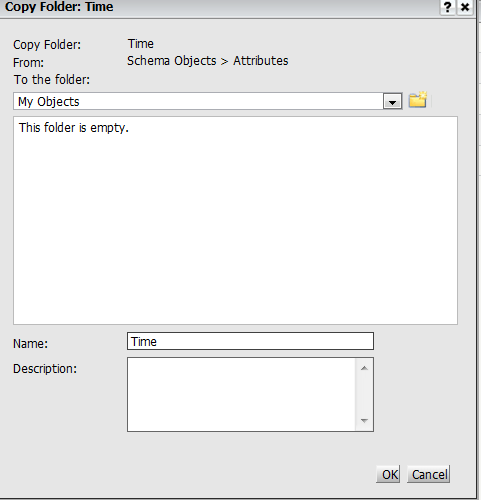
The schema objects can then be seen in Desktop in the users Profile folder or in Public Objects.
CAUSE:
This is a known issue in Strategy Web 9.x and above.
ACTION:
Contact Strategy Technical Support for an update on the status of this issue.
WORKAROUND:
The Administrator can disable the Web Object Search privilege under Web Reporter, however this workaround may not be acceptable to all.