In some cases it may be beneficial to use a TNSNames file in order to setup connectivity to an Oracle Database or listener service for use with Strategy 9.x and newer. In these cases, the following steps can be followed in order to setup the connectivity. In all cases, it is assumed that a TNSNames.ora file is already provided by the Database Administrator.
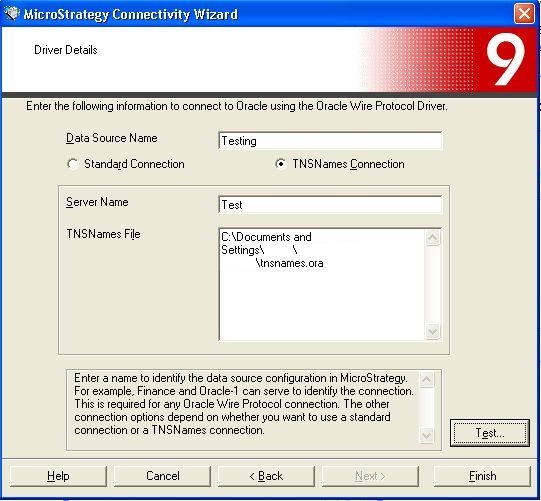
If a GUI is not available, manually creating the entry in the ODBC.ini file will be required. An example file is below:
TNSNAMES=Strategy ODBC Driver for Oracle Wire Protocol
  ...

[TNSNAMES]
ServerName=Test
TNSNamesFile=/home/mstr902/MicroStrategy/tnsnames.ora
Driver=/home/mstr902/MicroStrategy/install/lib32/MYoraXX.so
Description=Strategy ODBC Driver for Oracle Wire Protocol
ApplicationUsingThreads=1
ArraySize=60000
CachedCursorLimit=32
CachedDescLimit=0
CatalogIncludesSynonyms=1
CatalogOptions=0
DefaultLongDataBuffLen=1024
EnableDescribeParam=1
EnableNcharSupport=1
EnableScrollableCursors=1
EnableStaticCursorsForLongData=0
EnableTimestampWithTimeZone=0
IgnoreODBCTimeStampLiteral=1
LocalTimeZoneOffset=
LockTimeOut=-1
ProcedureRetResults=0
UseCurrentSchema=1
IANAAppCodePage=111
