EducationSoftwareStrategy.com
StrategyCommunity

Knowledge Base

Product

Community

Knowledge Base

TopicsBrowse ArticlesDeveloper Zone

Product

Download SoftwareProduct DocumentationSecurity Hub

Education

Tutorial VideosSolution GalleryEducation courses

Community

GuidelinesGrandmastersEvents
x_social-icon_white.svglinkedin_social-icon_white.svg
Strategy logoCommunity

© Strategy Inc. All Rights Reserved.

LegalTerms of UsePrivacy Policy
  1. Home
  2. Topics

KB38684: Derived count metric gives repeating values whereas a standard count metric with the same definition gives correct results in MicroStrategy 9.4.1 and 10.x.


Stefan Zepeda

Salesforce Solutions Architect • Strategy


In MicroStrategy 9.4.1 and 10.x, a report that uses a derived count metric will result in having the metric show a repeating value for all rows. A standard metric with the same formula will display the results correctly.

SYMPTOM:
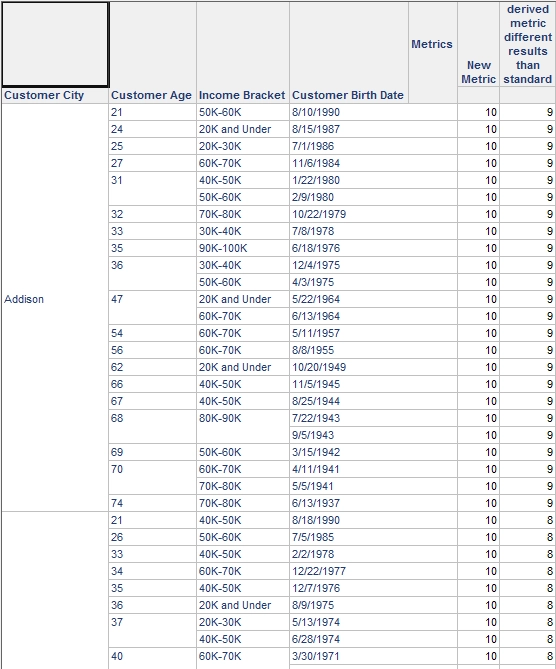
In Strategy 9.4.1 and 10.x, a report that uses a derived count metric will result in having the metric show a repeating value for all rows. A standard metric with the same formula will display the results correctly, as shown in the report below:
 

ka044000000kIPDAA2_0EM440000002DPh.png

 
CAUSE:
UseLookUpForAttributes is set to "True", which means that the calculation will use the lookup table to search for the direct parent child relationship to determine how the count should calculate. In above example, "Income Bracket" and "Customer City" are related but not directly through a parent child relationship. The analytical engine then does not know how to calculate the count and will instead determine the maximum value of the count and repeat that for all rows.
The standard metric will evaluate correctly as it is calculated in SQL passes and not handled in the analytical engine.
 
ACTION:
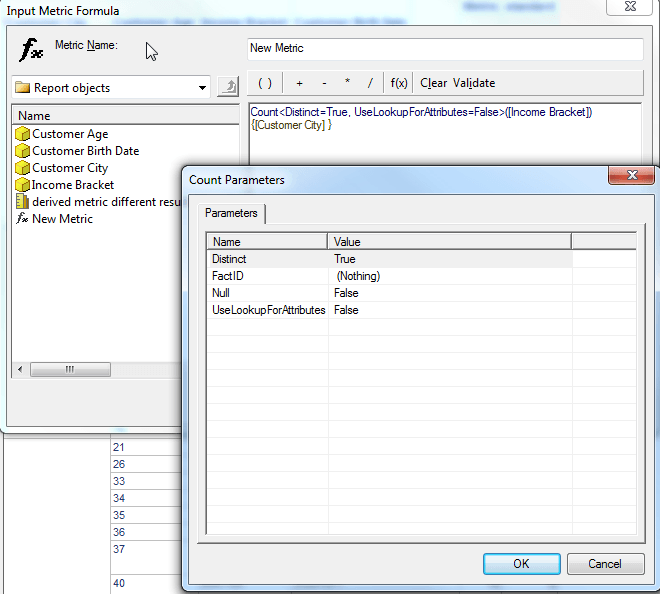
Change the count parameter of UseLookUpForAttributes to "False" so the count calculation will be based on the values returned to the analytical engine instead of those in the lookup table as shown below:
ka044000000kIPDAA2_0EM440000002DPb.png


Comment

0 comments

Details

Knowledge Article

Published:

June 1, 2017

Last Updated:

June 1, 2017