In Strategy Office, the following diagnostic logging options are available and helpful for troubleshooting Strategy Office issues:
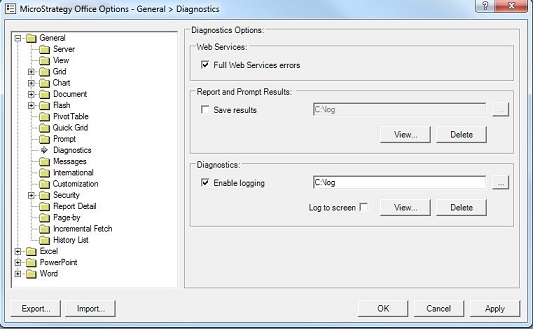
1. Full Web Services errors
2. Diagnostics
For more information on how to enable Strategy Office diagnostics logging please, see the following technical note:
KB13992: How to enable logging in MicroStrategy Office 9.x and 10.x
After enabling each of these logging options the following logs will be created:
1. Full Web Services errors
This allows for more in depth logging in the "MWSJavaLog" under Web Services directory.
2. Diagnostics
This creates the Strategy Office log as "moilog" in the location specified in the Strategy Office Configuration > General > Diagnostics for "Enable logging".
