EducationSoftwareStrategy.com
StrategyCommunity

Knowledge Base

Product

Community

Knowledge Base

TopicsBrowse ArticlesDeveloper Zone

Product

Download SoftwareProduct DocumentationSecurity Hub

Education

Tutorial VideosSolution GalleryEducation courses

Community

GuidelinesGrandmastersEvents
x_social-icon_white.svglinkedin_social-icon_white.svg
Strategy logoCommunity

© Strategy Inc. All Rights Reserved.

LegalTerms of UsePrivacy Policy
  1. Home
  2. Topics

KB38687: How to move Users and User Groups across metadata - from one DBMS to another with MicroStrategy Object Manager


Community Admin

• Strategy


How to move Users and User Groups across metadata - from one DBMS to another with MicroStrategy Object Manager.

QUESTION:
What is the most efficient way to move all of users and user groups from source to destination project after all of schema objects have been moved to destination project? This may be an important steps if project duplication was performed across metadata repositories without users. When the size of the project is big and the amount of time required for the migration is estimated to be very long like days, project duplication may be done without users first. Then, the users need to be migrated after the project duplication has been completed.
 
ANSWER:
Object Manager allows you to move the user objects from one metadata to the other metadata regardless the flavor of DBMS used for the repositories. When all of the users and user groups need to be migrated, try following steps:
 
Note: To simplify the scenario, there is no project in the destination project. But the same idea works when there are projects already duplicated in the destination repository.

  • In source project, expand "Everyone" user group, then, select all users listed. Drag and drop the users to "Everyone" group of the destination project.
ka04W00000148LTQAY_0EM440000002DQZ.jpeg
  • At the conflict resolution, notice that all of the user groups including sub user groups are listed.
     
ka04W00000148LTQAY_0EM440000002DQV.jpeg
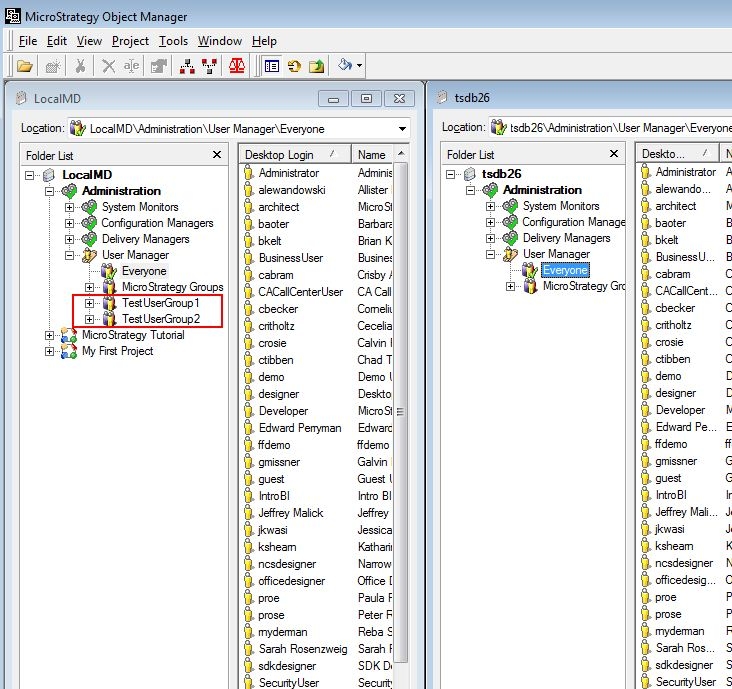
  • Object Manager does not show the newly migrated user groups until you logout and log back in.

ka04W00000148LTQAY_0EM440000002DQT.jpeg
  • *Migrated User Groups can be seen after re-login:

ka04W00000148LTQAY_0EM440000002DQX.jpeg

For alternate steps to migrate User Groups and Users, please see:

  • TN 33114 - How to migrate User Groups and Users between Metadatas using Object Manager 9.0.x


Comment

0 comments

Details

Knowledge Article

Published:

May 18, 2017

Last Updated:

May 18, 2017