EducationSoftwareStrategy.com
StrategyCommunity

Knowledge Base

Product

Community

Knowledge Base

TopicsBrowse ArticlesDeveloper Zone

Product

Download SoftwareProduct DocumentationSecurity Hub

Education

Tutorial VideosSolution GalleryEducation courses

Community

GuidelinesGrandmastersEvents
x_social-icon_white.svglinkedin_social-icon_white.svg
Strategy logoCommunity

© Strategy Inc. All Rights Reserved.

LegalTerms of UsePrivacy Policy
  1. Home
  2. Topics

KB38697: "No available tables were found in the warehouse catalog" appears when viewing the tables contained in a database instance that uses Microsoft Excel as the database, in MicroStrategy Developer 9.x


Stefan Zepeda

Salesforce Solutions Architect • Strategy


"No available tables were found in the warehouse catalog" appears when viewing the tables contained in a database instance that uses Microsoft Excel as the database, in MicroStrategy Developer 9.x

SYMPTOM:
 
Within warehouse catalog pointing to a database instance that uses Excel, the message that no available tables were found in the warehouse catalog is shown in Strategy  9.x.
 

ka02R000000kbjqQAA_0EM440000002DPU.png


No available tables were found in the warehouse catalog.  This can happen due to three possible causes: a) All tables are already part of the project. b) An incorrect custom SQL statement is being used, or c) The warehouse connection is not defined correctly.
 
CAUSE:
 
This can occur due to the warehouse tables within the Excel file not being setup properly or the named spaces not being correctly defined. 
  
ACTION:
 
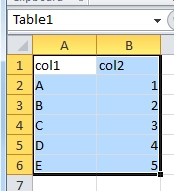
To set them up properly go into Microsoft Excel highlight the appropriate table space necessary and name the grouped cells whatever table name should appear in the warehouse catalog.
 

ka02R000000kbjqQAA_0EM440000002DPN.png


Comment

0 comments

Details

Knowledge Article

Published:

June 9, 2017

Last Updated:

June 9, 2017