EducationSoftwareStrategy.com
StrategyCommunity

Knowledge Base

Product

Community

Knowledge Base

TopicsBrowse ArticlesDeveloper Zone

Product

Download SoftwareProduct DocumentationSecurity Hub

Education

Tutorial VideosSolution GalleryEducation courses

Community

GuidelinesGrandmastersEvents
x_social-icon_white.svglinkedin_social-icon_white.svg
Strategy logoCommunity

© Strategy Inc. All Rights Reserved.

LegalTerms of UsePrivacy Policy
  1. Home
  2. Topics

KB38702: When no data is returned for a Report Services Document document containing a group by, the "no data returned" message does not display in Interactive mode in MicroStrategy Web 9.0.2.


Community Admin

• Strategy


SYMPTOM
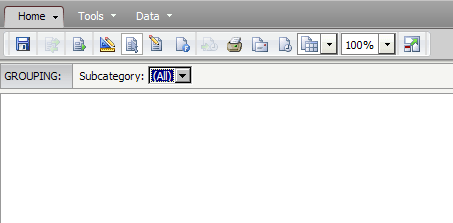
In Strategy Web 9.0.2, when no data is returned for a grid or graph within a document, the "no data returned" message does not display in Interactive mode when a group by attribute is present. Instead, an empty grid or graph displays as shown below.
 

ka04W000000OcUEQA0_0EM4400000027LE.png

 
STEPS TO REPRODUCE

  1. In Strategy Tutorial, create a report with Year, Category, Subcategory, Quarter, and Brand vs. Profit.
  2. Insert a report filter with the criteria Year NOT IN LIST
  3. Create a document using the dataset and insert a grid with Year in rows, Category in columns, and Subcategory in the Group By.
  4. Run the document in Interactive View Mode.  The "no data returned" message does not show.

CAUSE
This is a known issue in Strategy Web 9.0.2.
 
ACTION
 
Contact Strategy Technical Support for an update on this issue. 
 
WORKAROUND
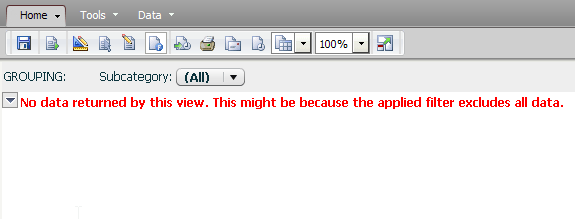
Run document in Flash mode - the message will display as expected. See screen shot below.
 

ka04W000000OcUEQA0_0EM4400000027LL.png


Comment

0 comments

Details

Knowledge Article

Published:

July 18, 2017

Last Updated:

July 18, 2017