EducationSoftwareStrategy.com
StrategyCommunity

Knowledge Base

Product

Community

Knowledge Base

TopicsBrowse ArticlesDeveloper Zone

Product

Download SoftwareProduct DocumentationSecurity Hub

Education

Tutorial VideosSolution GalleryEducation courses

Community

GuidelinesGrandmastersEvents
x_social-icon_white.svglinkedin_social-icon_white.svg
Strategy logoCommunity

© Strategy Inc. All Rights Reserved.

LegalTerms of UsePrivacy Policy
  1. Home
  2. Topics

KB38712: "Error in loading dll" appears when user tries to export reports from MicroStrategy Developer 9.x to Microsoft Access


Stefan Zepeda

Salesforce Solutions Architect • Strategy


"Error in loading dll" appears when user tries to export reports from MicroStrategy Developer 9.x to Microsoft Access

SYMPTOM:
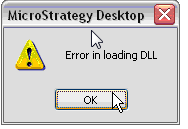
When user tries to export reports from Strategy Developer 9.x to Microsoft Access 2010, error dialog appears: "error in loading dll". occurrence of error is machine specific.
 

ka02R000000bskxQAA_0EM440000002DP0.png


Sample Code/Error
Error in loading DLL
 
CAUSE:
 
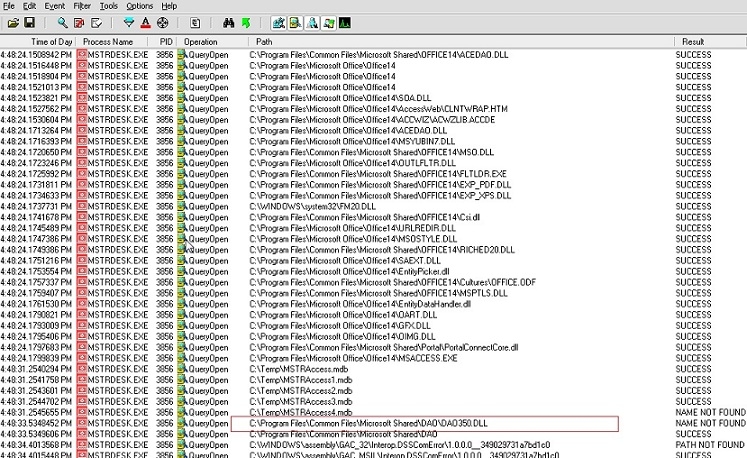
The needed dll file is missing or not registered. Using Process Monitor and Dependency Walker, the issue dll was found to be 350.dll:
 

ka02R000000bskxQAA_0EM440000002DOy.jpeg

 
(screen shot from Process Monitor output)
 
 This dll is normally located in C:\Program Files\Common Files\microsoft shared\DAO.
 
For information on Depedency Walker and Process Monitor, refer to the following Strategy Knowledge Base technical note:
KB9579 (KB1200-000-0046): How to use the Dependency Walker and FileMon tools to find corrupted .dll's )
 
ACTION:

  1. If no dll file is present in C:\Program Files\Common Files\microsoft shared\DAO folder, obtain a copy of 350.dll or 360.dll.
  2. If copy of 350.dll or 360.dll is present, register it through regsvr32.exe.In the Windows Start | Run command, input the following to register the dll: regsvr32 "c:\program files\common files\microsoft shared\dao\dao360.dll"


Third Party Software Installation WARNING:
The third-party product(s) discussed in this technical note is manufactured by vendors independent of Strategy. Strategy makes no warranty, express, implied or otherwise, regarding this product, including its performance or reliability


Comment

0 comments

Details

Knowledge Article

Published:

June 15, 2017

Last Updated:

June 17, 2020