EducationSoftwareStrategy.com
StrategyCommunity

Knowledge Base

Product

Community

Knowledge Base

TopicsBrowse ArticlesDeveloper Zone

Product

Download SoftwareProduct DocumentationSecurity Hub

Education

Tutorial VideosSolution GalleryEducation courses

Community

GuidelinesGrandmastersEvents
x_social-icon_white.svglinkedin_social-icon_white.svg
Strategy logoCommunity

© Strategy Inc. All Rights Reserved.

LegalTerms of UsePrivacy Policy
  1. Home
  2. Topics

KB38874: Users that do not have permission to see an attribute can still see it in MicroStrategy Developer


Stefan Zepeda

Salesforce Solutions Architect • Strategy


In MicroStrategy Developer, users that do not have permission to see an attribute can still see it in the folder. Example:

SYMPTOM:
 
In Strategy Developer, users that do not have permission to see an attribute can still see it in the folder. Example:
 
User "a" has been given the "Denied All" permission to attribute "test":
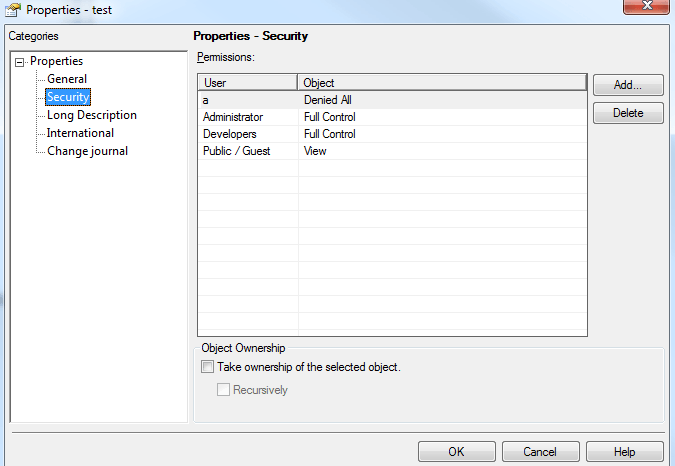
ka02R000000kVrWQAU_0EM440000002DQ0.png


But this user can still see the attribute through Developer.
 
CAUSE:
 
This is because user "a" has either the privilege "Bypass schema objects security access checks" under the Architect group or "Bypass all object security access checks" under the Administration group.  These privileges will enable a Strategy user to bypass access control limitations:
 

ka02R000000kVrWQAU_0EM440000002DPy.png


Comment

0 comments

Details

Knowledge Article

Published:

May 19, 2017

Last Updated:

May 19, 2017