EducationSoftwareStrategy.com
StrategyCommunity

Knowledge Base

Product

Community

Knowledge Base

TopicsBrowse ArticlesDeveloper Zone

Product

Download SoftwareProduct DocumentationSecurity Hub

Education

Tutorial VideosSolution GalleryEducation courses

Community

GuidelinesGrandmastersEvents
x_social-icon_white.svglinkedin_social-icon_white.svg
Strategy logoCommunity

© Strategy Inc. All Rights Reserved.

LegalTerms of UsePrivacy Policy
  1. Home
  2. Topics

KB38930: Unable to create an ODBC DSN on Red Hat Enterprise Linux 6.x in MicroStrategy 9.2.1


Community Admin

• Strategy


Red Hat Enterprise Linux 6.1 has been post-certified with MicroStrategy Intelligence Server 9.2.1 Hotfix 1 and higher.

SYMPTOM:
Red Hat Enterprise Linux 6.1 has been post-certified with Strategy Intelligence Server 9.2.1 Hotfix 1 and higher. Refer to the following Knowledge Base article for additional information:
KB38921: Certification of Red Hat Enterprise Linux 6.1 with MicroStrategy Intelligence Server 9.2.1 HF1
When attempting to create an ODBC DSN in either the Strategy Connectivity Wizard (mstrconnectwiz) or the Strategy ODBC Administrator (mstrodbcadm), the following error is shown on the terminal:

ka04W000000OekcQAC_0EM440000002HP7.png

 
 After several minutes the following error message is displayed:
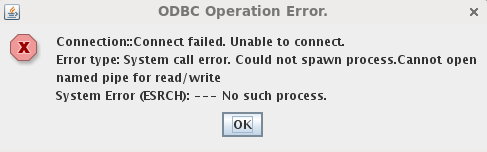
ka04W000000OekcQAC_0EM440000002HP5.png


Sample Code/Error
Connection::Connect failed. Unable to connect.

Error type: System call error. Could not spawn process.Cannot open named pipe for read/write

System Error (ESRCH): --- No such process.

 
This error occurs regardless of the database/ODBC driver for/with which the DSN is being created.
 
CAUSE:
This behavior was caused by missing Red Hat Linux packages that are required by Strategy.
In particular the packages that were missing are:


Sample Code/Error
compat-libstdc++-33.i686.rpm

libstdc++.4.4.6-3.el6.i686.rpm

 
ACTION:
To ensure that all package dependencies are being met for Strategy on Red Hat Enterprise Linux 6.1. please install the following packages:

Sample Code/Error

compat-libstdc++-33.i686

libXp.x86_64

elfutils-devel.i686

elfutils-libelf-devel.i686

elfutils-devel.x86_64

elfutils-libelf-devel.x86_64

libstdc++.4.4.6-3.el6.i686

krb5-libs.i686

nss-pam-ldapd.i686

 
Each package can be installed as "root" using the following command in a terminal window:
 

Sample Code/Error
# yum install <package name>

<Package name>  is the name of any one of the packages referenced above.


Comment

0 comments

Details

Knowledge Article

Published:

June 7, 2017

Last Updated:

June 7, 2017