SYMPTOM:
A metric whose dimensionality sets filtering to NONE for one or more attributes performs the specific and rare task of allowing a report to query against a desired fact table, when neither the report filter nor the template specify the desired attribute level.
STEPS TO REPRODUCE:
There are two fact tables in the warehouse. Fact_Subcat aggregates Revenue at the Subcategory level and Fact_Category aggregates at the Category level. The Product hierarchy is: Category - Subcategory - Item.
Throughout the following scenarios, Fact_Subcat is the desired fact table.
Scenario 1:
Template: Category, Revenue, M1
Filter: Empty
Metric: Revenue
M1 = Revenue with dimensionality Subcategory = NONE
select a21.CATEGORY_ID  CATEGORY_ID,
 sum(a21.TOT_DOLLAR_SALES) DOLLARSALES
into #ZZTGA00JHJ9MD00
from Fact_Category a21
group by a21.CATEGORY_ID


select a23.CATEGORY_ID  CATEGORY_ID,
 sum((a21.QTY_SOLD * (a21.UNIT_PRICE - a21.DISCOUNT))) SUBCATEGORY
into #ZZTGA00JHJ9MD01
from Fact_Subcat a21
 join LU_ITEM a22
   on  (a21.ITEM_ID = a22.ITEM_ID)
 join LU_SUBCATEG a23
   on  (a22.SUBCAT_ID = a23.SUBCAT_ID)
group by a23.CATEGORY_ID


select a21.CATEGORY_ID  CATEGORY_ID,
 a23.CATEGORY_DESC  CATEGORY_DESC,
 a21.DOLLARSALES DOLLARSALES,
 a22.SUBCATEGORY SUBCATEGORY
from #ZZTGA00JHJ9MD00 a21
 join #ZZTGA00JHJ9MD01 a22
   on  (a21.CATEGORY_ID = a22.CATEGORY_ID)
 join LU_CATEGORY a23
   on  (a21.CATEGORY_ID = a23.CATEGORY_ID)


drop table #ZZTGA00JHJ9MD00

drop table #ZZTGA00JHJ9MD01
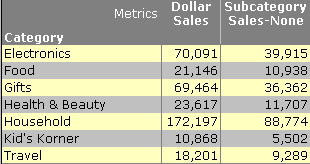
The Subcategory = NONE in M1 forces its SQL to query against Fact_Subcat, whereas Dollar Sales still queries against the aggregate table of Fact_Category. (In this scenario, if filtering and grouping were both standard for Subcategory, it would have the same effect on the SQL. The report level metric would be able to use the Category-level table, but the Subcategory-level metric would be forced to use Fact_Subcat.)
Scenario 2:
Template: Category, Revenue, M1
Filter: Subcategory = 1, 2, 3
Metric: Revenue
M1 = Revenue with dimensionality Subcategory = NONE
Advanced window: check "Add attributes in the filter to the level (dimensionality)"

select a23.CATEGORY_ID  CATEGORY_ID,
 sum((a21.QTY_SOLD * (a21.UNIT_PRICE - a21.DISCOUNT))) DOLLARSALES
into #ZZTGA00JJ5AMD00
from Fact_Subcat a21
 join LU_ITEM a22
   on  (a21.ITEM_ID = a22.ITEM_ID)
 join LU_SUBCATEG a23
   on  (a22.SUBCAT_ID = a23.SUBCAT_ID)
where a22.SUBCAT_ID in (1, 2, 3)
group by a23.CATEGORY_ID


select a23.CATEGORY_ID  CATEGORY_ID,
 sum((a21.QTY_SOLD * (a21.UNIT_PRICE - a21.DISCOUNT))) SUBCATEGORY
into #ZZTGA00JJ5AMD01
from Fact_Subcat a21
 join LU_ITEM a22
   on  (a21.ITEM_ID = a22.ITEM_ID)
 join LU_SUBCATEG a23
   on  (a22.SUBCAT_ID = a23.SUBCAT_ID)
where a22.SUBCAT_ID in (1, 2, 3)
group by a23.CATEGORY_ID


select a21.CATEGORY_ID  CATEGORY_ID,
 a23.CATEGORY_DESC  CATEGORY_DESC,
 a21.DOLLARSALES DOLLARSALES,
 a22.SUBCATEGORY SUBCATEGORY
from #ZZTGA00JJ5AMD00 a21
 join #ZZTGA00JJ5AMD01 a22
   on  (a21.CATEGORY_ID = a22.CATEGORY_ID)
 join LU_CATEGORY a23
   on  (a21.CATEGORY_ID = a23.CATEGORY_ID)


drop table #ZZTGA00JJ5AMD00

drop table #ZZTGA00JJ5AMD01

As expected, both passes of SQL query against Fact_Subcat (subcategory from the report filter is applied). The Subcategory filter is untouched in the dimensional metric, because the advanced setting allows the filter to be included.
Scenario 3:
All the settings are the same as Scenario 2 except the "Add attributes in the filter to the level (dimensionality)" is unchecked in the Advanced tab.
Template: Category, Revenue, M1
Filter: Subcategory = 1, 2, 3
Metric: M1 = Revenue with dimensionality Subcategory = NONE
Advanced window: uncheck "Add attributes in the filter to the level (dimensionality)"
select a23.CATEGORY_ID  CATEGORY_ID,
 sum((a21.QTY_SOLD * (a21.UNIT_PRICE - a21.DISCOUNT))) DOLLARSALES
into ZZMD00
from Fact_Subcat a21
 join LU_ITEM a22
   on  (a21.ITEM_ID = a22.ITEM_ID)
 join LU_SUBCATEG a23
   on  (a22.SUBCAT_ID = a23.SUBCAT_ID)
where a22.SUBCAT_ID in (1, 2, 3)
group by a23.CATEGORY_ID

select a23.CATEGORY_ID  CATEGORY_ID,
 sum((a21.QTY_SOLD * (a21.UNIT_PRICE - a21.DISCOUNT))) SUBCATEGORY
into ZZMD01
from Fact_Subcat a21
 join LU_ITEM a22
   on  (a21.ITEM_ID = a22.ITEM_ID)
 join LU_SUBCATEG a23
   on  (a22.SUBCAT_ID = a23.SUBCAT_ID)
group by a23.CATEGORY_ID

select a21.CATEGORY_ID  CATEGORY_ID,
 a23.CATEGORY_DESC  CATEGORY_DESC,
 a21.DOLLARSALES DOLLARSALES,
 a22.SUBCATEGORY SUBCATEGORY
from ZZMD00 a21
 join ZZMD01 a22
   on  (a21.CATEGORY_ID = a22.CATEGORY_ID)
 join LU_CATEGORY a23
   on  (a21.CATEGORY_ID = a23.CATEGORY_ID)

drop table ZZMD00

drop table ZZMD01
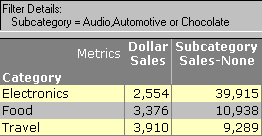
The following occurred in this report:
