EducationSoftwareStrategy.com
StrategyCommunity

Knowledge Base

Product

Community

Knowledge Base

TopicsBrowse ArticlesDeveloper Zone

Product

Download SoftwareProduct DocumentationSecurity Hub

Education

Tutorial VideosSolution GalleryEducation courses

Community

GuidelinesGrandmastersEvents
x_social-icon_white.svglinkedin_social-icon_white.svg
Strategy logoCommunity

© Strategy Inc. All Rights Reserved.

LegalTerms of UsePrivacy Policy
  1. Home
  2. Topics

KB38981: Transaction Service with Toggle or Switch control style is not working for computed calculations on iPad in MicroStrategy Mobile 9.2.1m and above


Community Admin

• Strategy


Transaction Service with Toggle or Switch control style is not working for computed calculations on iPad in MicroStrategy Mobile 9.2.1m and above

SYMPTOM:
 
A Transaction Services document with a Toggle or a Switch control style doess not working for computed calculations when executed on an iPad in Strategy Mobile 9.2.1m and above.
 
STEPS TO REPRODUCE:
 
Follow the steps below to reproduce the issue with Strategy Tutorial project:
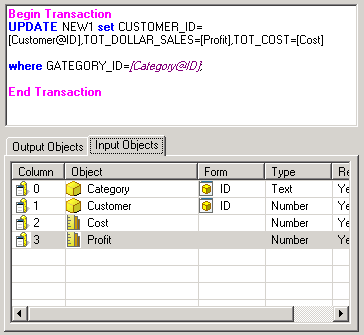
 

  1. Create a new report with the Customer and Category attributes and the Cost and Profit metrics.
  2. Create a transaction report to update data in a warehouse table, like shown below:
ka04W000000OaWhQAK_0EM4400000027JL.png


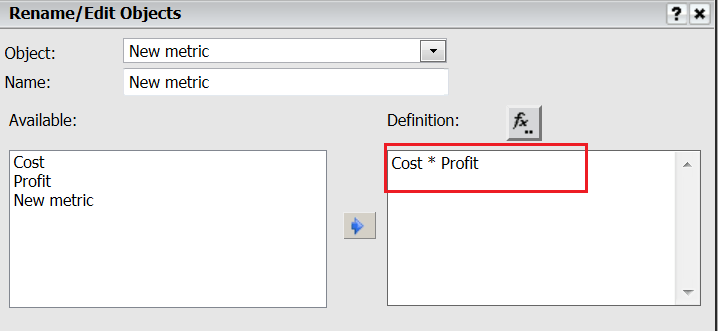
  • Create a new dashboard using the report created in Step 1 as the dataset. Insert a new derived metric defined as Cost*Profit, like shown below:
ka04W000000OaWhQAK_0EM4400000027JG.png


  • Drop the dataset into the dashboard to create a grid and add the new metric created in Step 3 as a column.
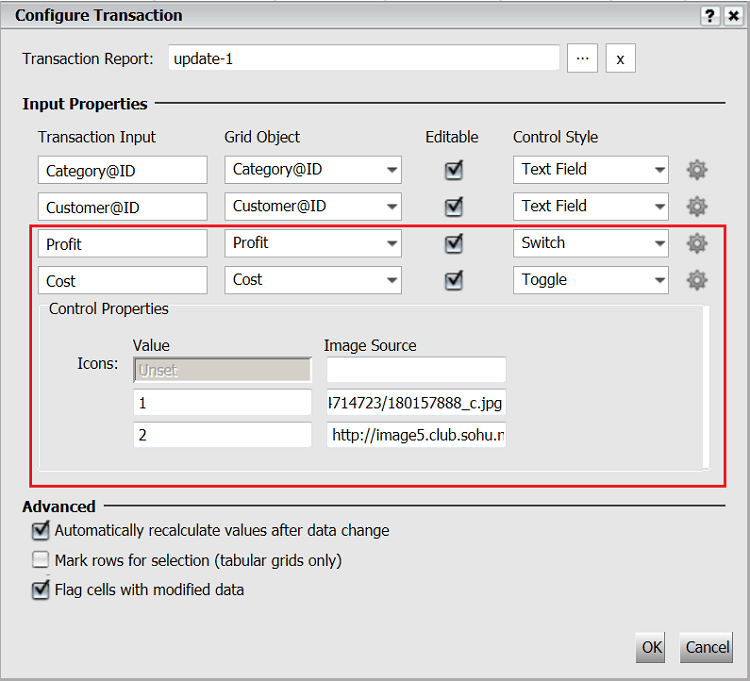
  • Right-click the grid and select Configure Transaction. Select the transaction report created in Step 2 and define the Input Properties like shown below:
ka04W000000OaWhQAK_0EM4400000027JF.png


  • Add Customer to the document grouping.
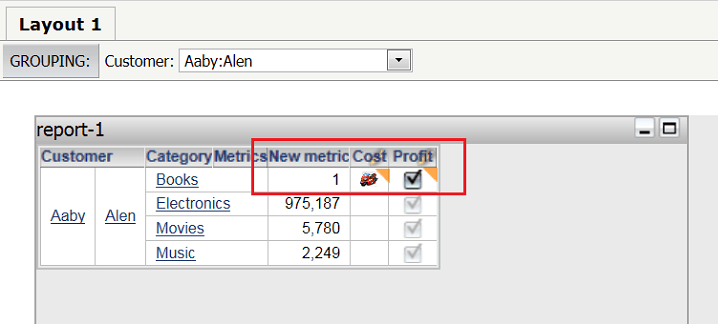
  • In Strategy Web, run the document in Express mode. Observe that when updating values in the Cost and Profit fields, the value of the derived metric updates automatically, like shown below:
ka04W000000OaWhQAK_0EM4400000027JN.png


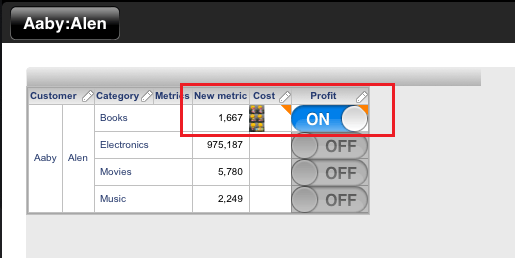
  • Now run the document on iPad. Observe that when updating values in the Cost and Profit fields, the value of the derived metric does not get updated, like shown below:
ka04W000000OaWhQAK_0EM4400000027JM.png

 
CAUSE:
 
This is byt design in Strategy Mobile 9.2.1m and above. It was  decided to disable the auto refresh for toggle and switch after modification to avoid stability issues when quickly tapping cells.


KB38981


Comment

0 comments

Details

Knowledge Article

Published:

June 30, 2017

Last Updated:

December 28, 2018