SYMPTOM:
After navigating to the URL to access the Mobile Administration page after creating a new web site within IIS, it may be noted that the "Mobile Configuration" link is absent from the menu on the left-hand side of the page:

The expected display would be as captured in the following screenshot:
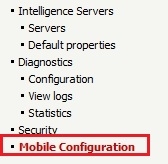
This does not occur if the 'Default Web Site' is used within the IIS application.
CAUSE:
A possible cause for this issue is the use of a shared application pool for the Strategy Web and Mobile applications.
ACTION:
Please ensure that different application pools are used within IIS for the Web and Mobile applications.
Third Party Software Installation:
WARNING:
The third-party product(s) discussed in this technical note is manufactured by vendors independent of Strategy. Strategy makes no warranty, express, implied or otherwise, regarding this product, including its performance or reliability.
