EducationSoftwareStrategy.com
StrategyCommunity

Knowledge Base

Product

Community

Knowledge Base

TopicsBrowse ArticlesDeveloper Zone

Product

Download SoftwareProduct DocumentationSecurity Hub

Education

Tutorial VideosSolution GalleryEducation courses

Community

GuidelinesGrandmastersEvents
x_social-icon_white.svglinkedin_social-icon_white.svg
Strategy logoCommunity

© Strategy Inc. All Rights Reserved.

LegalTerms of UsePrivacy Policy
  1. Home
  2. Topics

KB38994: After configuring the Diagnostics and Performance Logging tool to store performance counters in a file and persist to Statistics tables, they are written to the DSSPerformanceMonitor.csv file, but not to Statistics tables


Community Admin

• Strategy


SYMPTOM
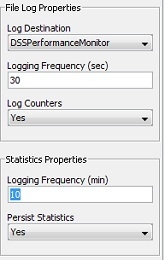
In Strategy 9.4.x - 10.4.x, it is possible to configure the Diagnostics and Performance Logging tool such that performance counters are saved to a file, as well as logged to Statistics tables for the purpose of Strategy Enterprise Manager reporting:
 

ka04W000000OgXNQA0_0EM4400000029r4.jpeg

 
However, even after applying this configuration, the data may be successfully written to the DSSPerformanceMonitor.csv file while nothing is written to the Statistics tables.
 
CAUSE
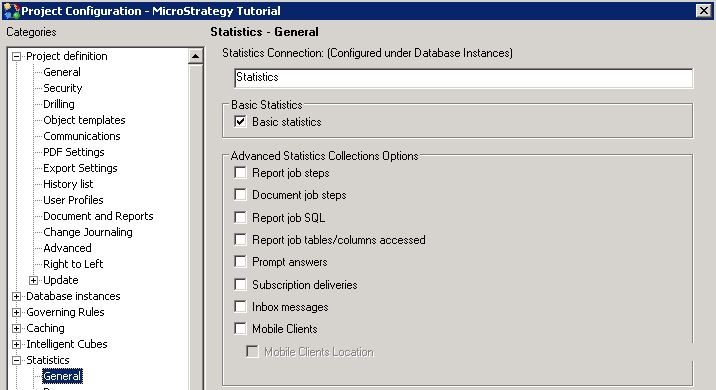
This issue can occur because Statistics logging is not enabled at the project level for any project that is currently loaded on the Strategy Intelligence Server. In order for Strategy Intelligence Server to successfully initiate Statistics logging, Statistics logging must be configured for one project at the least.
 
ACTION
To resolve this issue, enable basic statistics logging for at least one project. Make sure that this project is loaded upon Strategy Intelligence Server start-up.
 

ka04W000000OgXNQA0_0EM4400000029r6.jpeg


Comment

0 comments

Details

Knowledge Article

Published:

June 15, 2017

Last Updated:

June 15, 2017