EducationSoftwareStrategy.com
StrategyCommunity

Knowledge Base

Product

Community

Knowledge Base

TopicsBrowse ArticlesDeveloper Zone

Product

Download SoftwareProduct DocumentationSecurity Hub

Education

Tutorial VideosSolution GalleryEducation courses

Community

GuidelinesGrandmastersEvents
x_social-icon_white.svglinkedin_social-icon_white.svg
Strategy logoCommunity

© Strategy Inc. All Rights Reserved.

LegalTerms of UsePrivacy Policy
  1. Home
  2. Topics

KB39010: How to display "All" instead of "Null" for an unanswered, optional prompt in MicroStrategy Web 9.4.1 and 10.x.


Community Admin

• Strategy


How to display "All" instead of "Null" for an unanswered, optional prompt in MicroStrategy Web 9.4.1 and 10.x.

Within a document, the user has an optional prompt. When a user answers the prompt, the dashboard uses the syntax {&prompt1&} to populate the prompt answer. When the user does not answer the prompt, that same syntax defaults to "null" but the user would like it to show "All".  
 
The steps below show  how to change the default settings to show "All" instead of "Null."
ka04W000000Ock1QAC_0EM4400000027JE.png


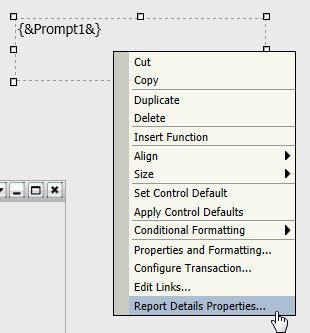
  • Right - click on the text box with the prompt and select "Report Details Properties."
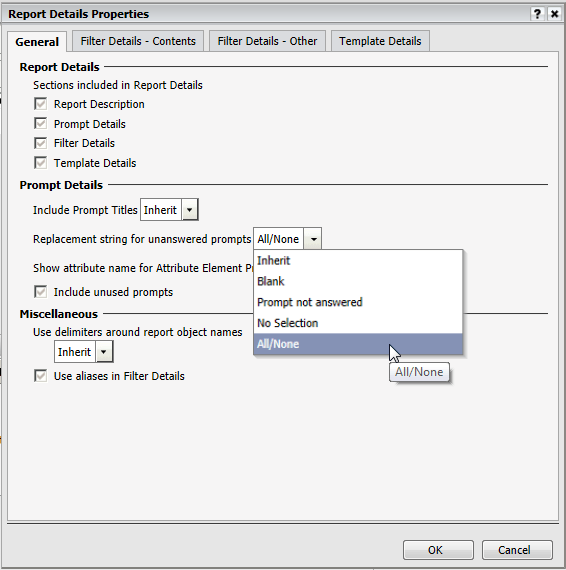
  • Once there, under the "General" tab, find "Prompt Details."
  • Set the "Replacement string for unanswered prompts", to "All/None." as shown below: 
ka04W000000Ock1QAC_0EM4400000027JA.png
  • Click "OK."
  • Save and close the report.

Comment

0 comments

Details

Knowledge Article

Published:

July 11, 2017

Last Updated:

July 11, 2017