EducationSoftwareStrategy.com
StrategyCommunity

Knowledge Base

Product

Community

Knowledge Base

TopicsBrowse ArticlesDeveloper Zone

Product

Download SoftwareProduct DocumentationSecurity Hub

Education

Tutorial VideosSolution GalleryEducation courses

Community

GuidelinesGrandmastersEvents
x_social-icon_white.svglinkedin_social-icon_white.svg
Strategy logoCommunity

© Strategy Inc. All Rights Reserved.

LegalTerms of UsePrivacy Policy
  1. Home
  2. Topics

KB39011: When using SQL Server 2008 as a warehouse, "unknown datatype" is displayed for columns using the date datatype in the Warehouse Catalog in MicroStrategy 9.2.1 on a Linux operating system.


Stefan Zepeda

Salesforce Solutions Architect • Strategy


When using SQL Server 2008 as a warehouse, "unknown datatype" is displayed for columns using the date datatype in the Warehouse Catalog in MicroStrategy 9.2.1 on a Linux operating system.

SYMPTOM:
When using an Intelligence Server on a Linux operating system connecting to a SQL Server 2008 data warehouse, an "unknown datatype" is displayed in for columns that should use the date datatype.
 
CAUSE:
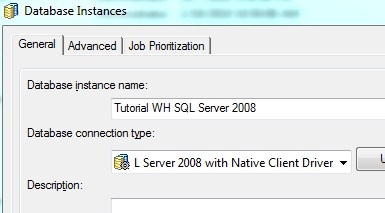
This issue appears when the database Instance "Database connection type" setting is set to "Microsoft SQL Server 2008"  and the Strategy 9.2.1 Intelligence Server is running on a Linux operating system. 
 
ACTION:
Users should change the "Database connection type" setting to "Microsoft SQL Server 2008 with Native Client Driver" which should allow the tables with date datatypes to be imported correctly into Strategy.
 

ka02R000000kcXAQAY_0EM440000002DO0.jpeg


WARNING MESSAGES: (Third Party Software Installation)
The third-party product(s) discussed in this technical note is manufactured by vendors independent of Strategy. Strategy makes no warranty, express, implied or otherwise, regarding this product, including its performance or reliability.


Comment

0 comments

Details

Knowledge Article

Published:

April 14, 2017

Last Updated:

April 14, 2017