SYMPTOM:
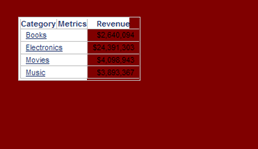
In a grid header that has no fill color, the fill color changes to white when the grid headers are locked in Strategy Web 9.x.
STEPS TO REPRODUCE:
1. Create a report with Category and Revenue.
2. Create a Report Services document and change the backround of the detail header section to Dark Red, or another noticeable color.
3. Add the report from step 1 as a grid to the Detail Header section.
4. Set the all headers and values to have no fill so that they display the dark red backround, as shown below.
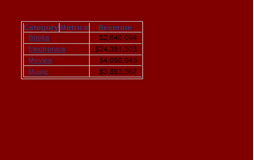
5. Lock the row and column headers. Notice how the fill color for the headers changes to white.
CAUSE:
This is a known issue with Strategy Web 9.x.
ACTION:
This issue is fixed in Strategy 10.x.Please upgrade to take advantage of the fix.
WORKAROUND:
Manually set the fill color of the cells to be the same color as the background.
