EducationSoftwareStrategy.com
StrategyCommunity

Knowledge Base

Product

Community

Knowledge Base

TopicsBrowse ArticlesDeveloper Zone

Product

Download SoftwareProduct DocumentationSecurity Hub

Education

Tutorial VideosSolution GalleryEducation courses

Community

GuidelinesGrandmastersEvents
x_social-icon_white.svglinkedin_social-icon_white.svg
Strategy logoCommunity

© Strategy Inc. All Rights Reserved.

LegalTerms of UsePrivacy Policy
  1. Home
  2. Topics

KB39017: How to share a MicroStrategy Intelligent Cube with users between different connections?


Community Admin

• Strategy


How to share a MicroStrategy Intelligent Cube with users between different connections?

The following steps explain how to share a Strategy Intelligent Cube with users between different connections:
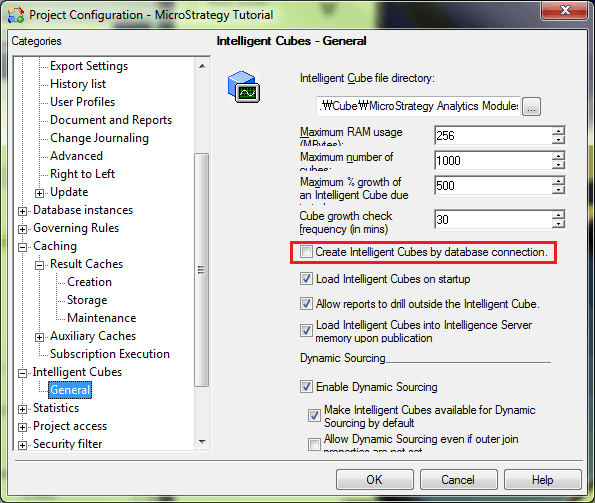
  • In Strategy Desktop, open Project Configuration window for a project, uncheck the option "Create Intelligent Cubes by database connection" under Intelligent Cubes > General, as shown below:
     
ka04W000000ObK2QAK_0EM4400000029qs.png
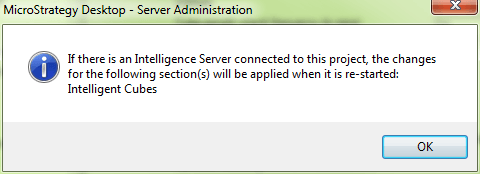
  • Restart Strategy Intelligence Server to make the change take effect, as shown below:
     
ka04W000000ObK2QAK_0EM4400000029qo.png

NOTE: Refer to the following technical note in Strategy Knowledge Base for more details about connection mapping:
 
KB19365: How to create connection mapping for a user group in MicroStrategy Command Manager 9.x and 10.x 


Comment

0 comments

Details

Knowledge Article

Published:

June 5, 2017

Last Updated:

June 5, 2017