EducationSoftwareStrategy.com
StrategyCommunity

Knowledge Base

Product

Community

Knowledge Base

TopicsBrowse ArticlesDeveloper Zone

Product

Download SoftwareProduct DocumentationSecurity Hub

Education

Tutorial VideosSolution GalleryEducation courses

Community

GuidelinesGrandmastersEvents
x_social-icon_white.svglinkedin_social-icon_white.svg
Strategy logoCommunity

© Strategy Inc. All Rights Reserved.

LegalTerms of UsePrivacy Policy
  1. Home
  2. Topics

KB39020: Changing the border of a column header or grid within MicroStrategy Developer 10.x does not change the appearance of the border.


Stefan Zepeda

Salesforce Solutions Architect • Strategy


In MicroStrategy Developer 10.x, when a user has a grid and attempts to change the border of one of the column headers, the border does not appear.

Description

In Strategy Developer 10.x, when a user has a grid and attempts to change the border of one of the column headers, the border does not appear.

Steps to Reproduce

Follow the steps below to reproduce this issue in Strategy Developer 10.x
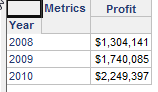
  • In Strategy Developer 10.x, run a grid report.
ka02R000000g2q4QAA_0EM440000002DNu.png
  • Right-click one of the headers and select Grid Borders.
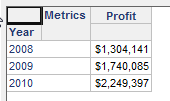
  • When the dialog box appears, change the border and click OK. Note that the grid changes are not applied as shown in the image below.
ka02R000000g2q4QAA_0EM440000002DNw.png

Why is this happening?

This is a known issue in Strategy Developer 10.x.

Solution

Contact Strategy Technical Support for an update on the status of this issue.

Learning Resources

Interested in learning more? Visit the Learning Center on Community!


Comment

0 comments

Details

Knowledge Article

Published:

May 12, 2017

Last Updated:

May 12, 2017