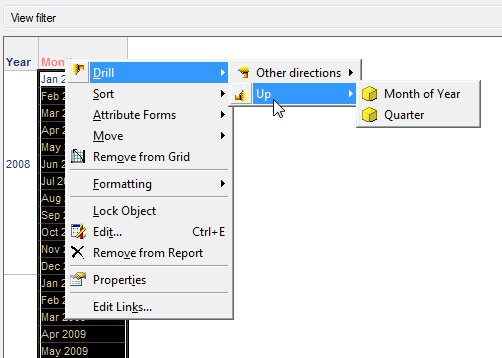
SYMPTOM:
Users are able to drill to attributes that do not have drilling relationships defined within the respective hierarchy. "Use as drill hierarchy" option is enabled for the hierarchy.
For example, a Time hierarchy object is defined as shown below, with "Use as drill hierarchy" enabled:
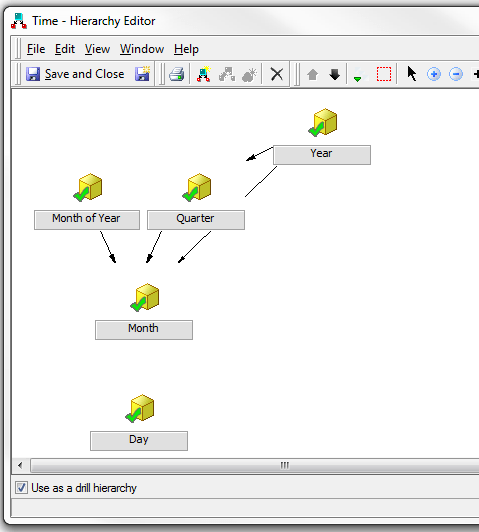
Attributes in this time dimension should not have drilling capabilities to the "Day" attribute, because no relationship is set for "Day" to other attributes within the hierarchy. Thus, users should not be able to drill down to "Day" from other attributes within the hierarchy.
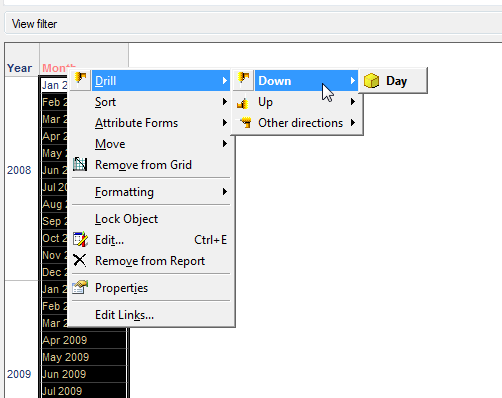
But running a report with "Year" and "Month" on the grid, the drill options for "Day" is available as shown below:
CAUSE:
A possible cause is that no default drill map has been set for the project.
ACTION:
The "Use as drill hierarchy" option is dependent on a default drill map object called "ProjectDrillMap", which may not be in use by the project.
Verify if a default drill map is set for the issue project by opening Project Configuration in Strategy Developer and navigating to Project Definition -> Drilling as shown in the image below.
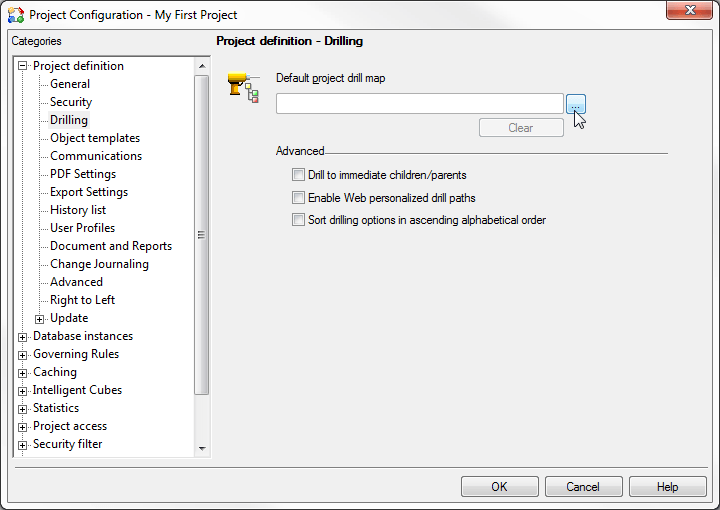
If no drill map is in use, use the browse button to select the "ProjectDrillMap" drill map object in the Public Objects > Drill Maps folder (if no objects are shown in the folder, enable browsing of hidden objects).
After making the change, attributes within the hierarchy should display expected drilling behavior (i.e. no drilling down to "Day" is available) as shown below: