INTRODUCTION
Pass-through expressions, also called Apply functions, allow use of special functions or syntactic constructs beyond what Strategy can create on its own, but can be obtained through the relational database. They act as containers for non-standard SQL expressions that Strategy does not support.
The Apply functions are not meant to take the place of the standard Strategy functions. Instead, they are intended to enhance the Strategy product by taking advantage of features and customizations that the RDBMS platforms can offer. There are five predefined Apply functions, each belonging to a different function type - ApplySimple, ApplyAgg, ApplyOLAP, ApplyComparison, ApplyLogical. In this article we will discuss the ApplySimple function. The other functions are covered in other articles.
ApplySimple:
ApplySimple is a function that allows users to send direct input to the warehouse without any assumption or special handling of what is inside the custom SQL by Strategy. This custom SQL can be used in the fact, attribute form expression, filter and metric editors.
SYNTAX:
ApplySimple("expression_with_placeholders", parameter_1, …, parameter_n)
where expression_with_placeholders is a valid SQL expression for the Database Management System (DBMS) using placeholders with the format '#n'. '#' is a reserved character for Strategy and 'n' is the number of the parameters (arguments) outside the quotes, starting with 0 and increasing in increments of 1.
parameter_1, …, parameter_n is the list of parameters that replaces the placeholders inside the quotes.
Note: Each comma is followed by a space character.
EXAMPLE 1:
This example shows how a case expression can be implemented in a metric created for a project using a Teradata database:
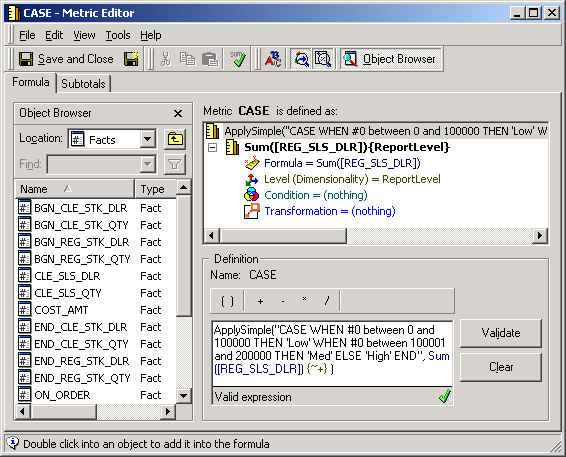
ApplySimple(" CASE WHEN #0 between 0 and 100000 THEN 'Low' WHEN #0 between 100001 and 200000 THEN 'Med' ELSE 'High' END ", Sum([REG_SLS_DLR])
In this case the #0 will be replaced with the parameter outside the quotes and generates the following SQL:
select a21.STORE_NBR STORE_NBR,
max(a23.STORE_DESC) STORE_DESC,
a21.CLASS_NBR CLASS_NBR,
max(a22.CLASS_DESC) CLASS_DESC,
sum(a21.REG_SLS_DLR) REGULARSALE,
CASE WHEN sum(a21.REG_SLS_DLR) between 0 and 100000 THEN 'Low' WHEN sum(a21.REG_SLS_DLR) between 100001 and 200000 THEN 'Med' ELSE 'High' END WJXBFS1
from appealing.STORE_CLASS a21,
appealing.LOOKUP_CLASS a22,
appealing.LOOKUP_STORE a23
where a21.CLASS_NBR = a22.CLASS_NBR and
a21.STORE_NBR = a23.STORE_NBR
and a21.STORE_NBR in (8)
group by a21.STORE_NBR,
a21.CLASS_NBR
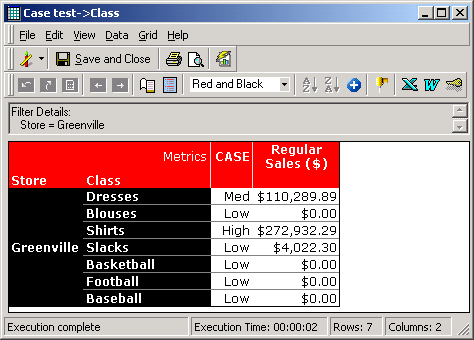
The results are shown as follows:
EXAMPLE 2:
This example shows how a database date difference function can be implemented in a metric created for a project using Microsoft SQL Server:
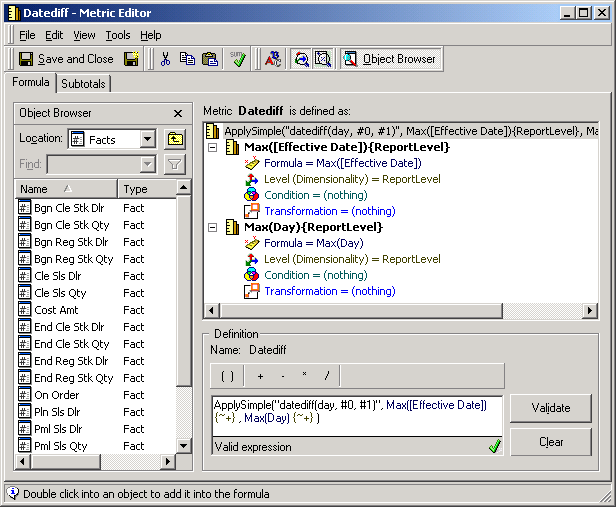
datediff(day, #0, #1) ", Max([Effective Date]) , Max(Day))
In this case #0 will be replaced with the Max( metric, #1 will be replaced with the second parameter (Max(Day)) and the report will generate the following SQL:
select distinct r21.CUR_TRN_DT CUR_TRN_DT,
r22.EFF_DATE EFF_DATE
into #ZZTJY00RBZGPO00
from STORE_ITEM_99 r21,
EFFDATE_ST_ITEM r22,
LOOKUP_DAY r23
where r21.CLASS_NBR = r22.CLASS_NBR and
r21.ITEM_NBR = r22.ITEM_NBR and
r21.STORE_NBR = r22.STORE_NBR and
r21.CUR_TRN_DT = r23.CUR_TRN_DT
and r23.YEAR_ID in (1999)
select a31.ITEM_NBR ITEM_NBR,
a31.CLASS_NBR CLASS_NBR,
a31.EFF_DATE EFF_DATE,
a32.CUR_TRN_DT CUR_TRN_DT,
max(a31.EFF_DATE) WJXBFS1
into # ZZTJY00RBZGSP02
from EFFDATE_ST_ITEM a31,
#ZZTJY00RBZGPO00 a32
where a31.EFF_DATE = a32.EFF_DATE
group by a31.ITEM_NBR,
a31.CLASS_NBR,
a31.EFF_DATE,
a32.CUR_TRN_DT
select a33.ITEM_NBR ITEM_NBR,
a33.CLASS_NBR CLASS_NBR,
a32.EFF_DATE EFF_DATE,
a31.CUR_TRN_DT CUR_TRN_DT,
max(a31.CUR_TRN_DT) WJXBFS1
into #ZZTJY00RBZGSP03
from LOOKUP_DAY a31,
#ZZTJY00RBZGPO00 a32,
EFFDATE_ST_ITEM a33
where a31.CUR_TRN_DT = a32.CUR_TRN_DT and
a32.EFF_DATE = a33.EFF_DATE
group by a33.ITEM_NBR,
a33.CLASS_NBR,
a32.EFF_DATE,
a31.CUR_TRN_DT
select a31.ITEM_NBR ITEM_NBR,
a31.CLASS_NBR CLASS_NBR,
a34.ITEM_DESC ITEM_DESC,
a34.CLASS_DESC CLASS_DESC,
a31.EFF_DATE EFF_DATE,
a31.CUR_TRN_DT CUR_TRN_DT
, datediff(day, a31.WJXBFS1 , a32.WJXBFS1) WJXBFS1
from # ZZTJY00RBZGSP02 a31 ,
#ZZTJY00RBZGSP03 a32,
LOOKUP_DAY a33,
LOOKUP_ITEM a34
where a31.CLASS_NBR = a32.CLASS_NBR and
a31.CUR_TRN_DT = a32.CUR_TRN_DT and
a31.EFF_DATE = a32.EFF_DATE and
a31.ITEM_NBR = a32.ITEM_NBR and
a31.CUR_TRN_DT = a33.CUR_TRN_DT and
a31.CLASS_NBR = a34.CLASS_NBR and
a31.ITEM_NBR = a34.ITEM_NBR
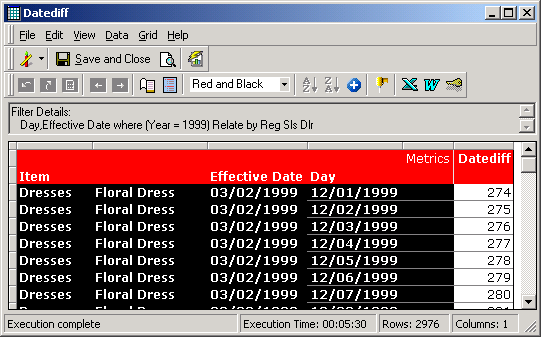
The results are:
For information on the ApplyComparison function refer to KB6178 - How to use the pass-through expression ApplyComparison in Strategy SQL Generation Engine
