EducationSoftwareStrategy.com
StrategyCommunity

Knowledge Base

Product

Community

Knowledge Base

TopicsBrowse ArticlesDeveloper Zone

Product

Download SoftwareProduct DocumentationSecurity Hub

Education

Tutorial VideosSolution GalleryEducation courses

Community

GuidelinesGrandmastersEvents
x_social-icon_white.svglinkedin_social-icon_white.svg
Strategy logoCommunity

© Strategy Inc. All Rights Reserved.

LegalTerms of UsePrivacy Policy
  1. Home
  2. Topics

KB39054: Is it possible to control Attribute Element Number Count Method for MDX reports?


Community Admin

• Strategy


Attribute Element Number Count Method is an advanced property that is hidden by default.  The incremental fetch feature uses a SELECT COUNT DISTINCT query. In some cases, this query can be costly for the data warehouse and make the element browse time longer than necessary for certain production environments.

Background:
 
Attribute Element Number Count Method is an advanced property that is hidden by default.  The incremental fetch feature uses a SELECT COUNT DISTINCT query. In some cases, this query can be costly for the data warehouse and make the element browse time longer than necessary for certain production environments.
 
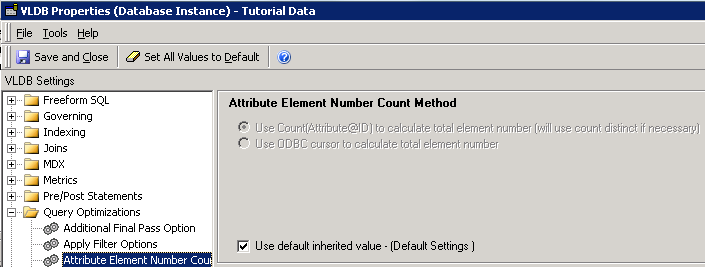
To alleviate this problem, the Attribute Element Number Count Method controls how the total number of rows are calculated. Two options are available as shown below:
 

ka04W000000Of8yQAC_0EM440000002JG0.png


  • Use Count(Attribute@ID) to calculate total element number (uses count distinct if necessary):
    This is the default option. In this case, the database determines the total number of rows. Note: For Tandem databases, the default is Use ODBC Cursor to calculate the total element number.
  • Use ODBC cursor to calculate the total element number:
    This setting causes Intelligence Server to determine the total number of rows by looping through the table after the initial SELECT pass.

The difference between the two approaches is whether the database or Intelligence Server determines the total number of records. Strategy recommends using the “Use ODBC cursor...” option (having Intelligence Server determine the total number of records) if you have a heavily taxed data warehouse or if the SELECT COUNT DISTINCT query itself introduces contention in the database. Having Intelligence Server determine the total number of rows results in more traffic between Intelligence Server and the database.
 
Note: This VLDB property is available at Database instance only
 
Question:
 
Is it possible to control Attribute Element Number Count Method for MDX reports in Strategy 9.x?
 
Answer:
No.
 
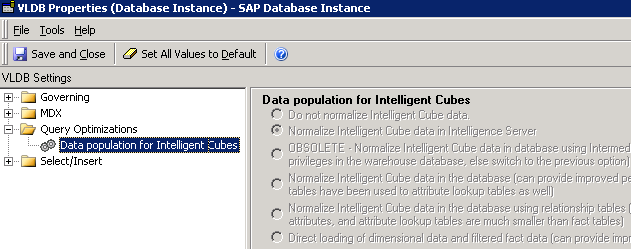
For MDX reports, only Data population for Intelligent Cube is available in Query Optimization for MDX database instances as shown below: 
 

ka04W000000Of8yQAC_0EM440000002JFz.png


Comment

0 comments

Details

Knowledge Article

Published:

June 2, 2017

Last Updated:

June 2, 2017