SYMPTOM:
In Strategy 9.x an Intelligent Cube based report with a smart metric and derived element calculation displays incorrect results. In the screen shot below, users may notice that the smart metric "M2" is defined in the format of "M1/ Revenue", while the metric "M1" is defined as Abs((Revenue - )).
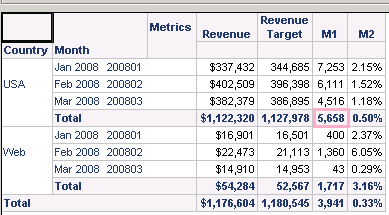
The result for the report is as shown below; The "M2" value for 2008 Q1 USA is 0.5%.

While the desired result is would be: M1 / Revenue=17,880/1,122,320=1.59% as demonstrated in the screen shot below from Microsoft Excel.

Reproduction steps for Strategy Tutorial:
1. Create a new metric called Revenue Target with the definition of Sum((1.05 * )) {~} as shown below:

2. Create a smart metric "M1" with definition of Abs((Revenue - )) and set it as a smart metric with dynamic aggregation as sum as shown below:

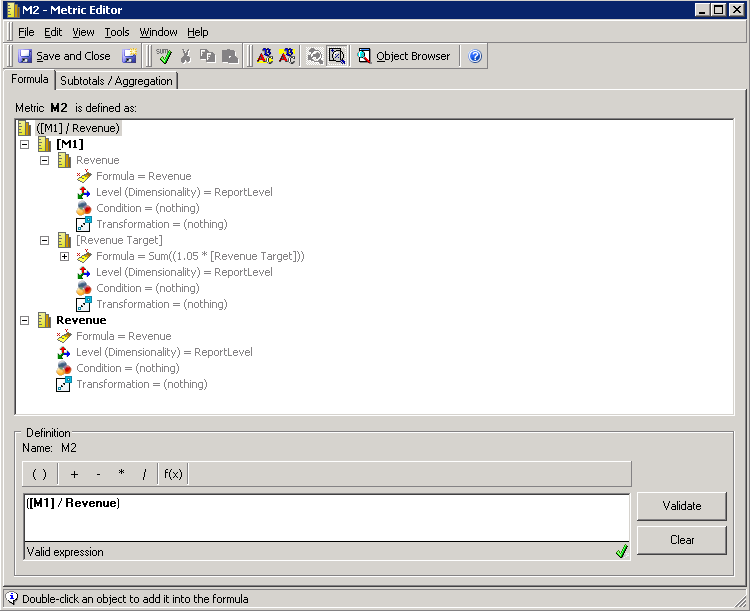
3. Create a smart derived metric "M2" with definition of ( / Revenue) and set it as a smart metric with dynamic aggregation as sum as shown below:
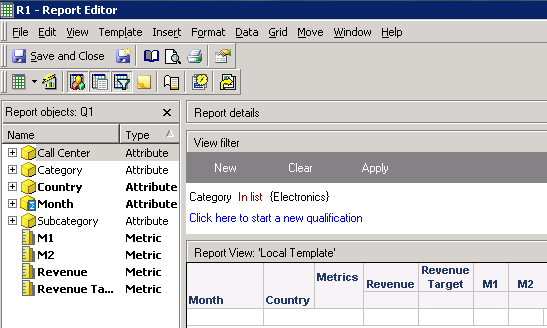
4. Create an intelligent cube called "Q1" with Attributes Category, Subcategory, Call Center, Country, Month and Metrics Revenue, Revenue Target, M1, M2 in the template as shown below and publish it:

5. Create a report called "R1" base on the intelligent cube created in step 4,
With Attributes Month, Country and Metrics Revenue, Revenue Target, M1, M2 in the template
With a view filter on Category Electronics
With month defined as derived elements with a filter on Month (2008 Q1: Month ID between 200801 and 200803 & 2009 Q1: Month ID between 200901 and 200903, uncheck the All Other element) as shown below:
6. Execute the report generates following result:

CAUSE:
The current behavior is by design. When Analytical Engine calculates smart metric, it will always decomposes the metric to its component metrics. For smart metric M2= /Revenue, it is decomposed to: Abs((Revenue - ))/Revenue.
Take "M2" value for 2008 Q1 USA for example:
M2= M1/ Revenue= Abs((Revenue - ))/Revenue=Abs(Sum(((Revenue - )))/Revenue=Abs(Sum (M1))/Revenue=Abs(7253+6111+4516)/Revenue=17,880/1,122,320=1.59%
M2=M1/ Revenue =Abs((Revenue - ))/Revenue= Abs (Sum(Revenue) - Sum())= 5, 658/1,122,320=0.50%
Expand the example to see clearly the data difference as below:
ACTION:
An issue has been logged to improve the product behaviour for this case. Users should contact Strategy Technical Support for an update with this issue.
WORKAROUND:
1. Create a non-smart metric with definition of "Abs((Sum(Revenue) {Country, Month, Category} - Sum((1.05 * )) {Country, Month, Category} ))" as shown below:

2. Then create a new smart metric called M4 with the definition of "( / Revenue)" as shown below:

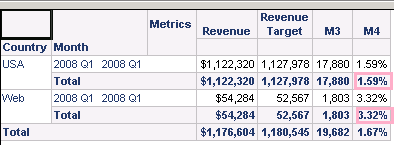
3. Execute the report generates desired result as shown below: