EducationSoftwareStrategy.com
StrategyCommunity

Knowledge Base

Product

Community

Knowledge Base

TopicsBrowse ArticlesDeveloper Zone

Product

Download SoftwareProduct DocumentationSecurity Hub

Education

Tutorial VideosSolution GalleryEducation courses

Community

GuidelinesGrandmastersEvents
x_social-icon_white.svglinkedin_social-icon_white.svg
Strategy logoCommunity

© Strategy Inc. All Rights Reserved.

LegalTerms of UsePrivacy Policy
  1. Home
  2. Topics

KB39063: "class java.lang.Exception: StartService failed. Error=: 1069" error message appears when configuring the Master Health Agent in MicroStrategy Health Center


Community Admin

• Strategy


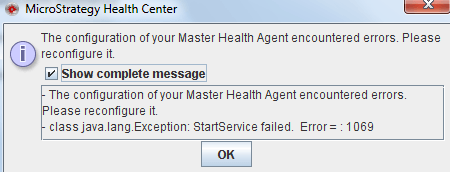
When configuring the Master Health Agent in MicroStrategy Health Center, an error message appears.

SYMPTOM:
When configuring the Master Health Agent in Strategy Health Center 9.x, the following error message appears:
ka04W00000148lhQAA_0EM4400000029qn.png


- The configuration of your Master Health Agent encounter errors. Please reconfigure it. 
- class java.lang.Exception: StartService failed. Error=: 1069



CAUSE:
The wrong user account was used to start the Strategy Master Health Agent windows service:

ka04W00000148lhQAA_0EM4400000029qk.png

 
ACTION:
Provide a user account with windows administrative privileges to start the Strategy Master Health Agent windows service.


Comment

0 comments

Details

Knowledge Article

Published:

June 9, 2017

Last Updated:

February 28, 2018