EducationSoftwareStrategy.com
StrategyCommunity

Knowledge Base

Product

Community

Knowledge Base

TopicsBrowse ArticlesDeveloper Zone

Product

Download SoftwareProduct DocumentationSecurity Hub

Education

Tutorial VideosSolution GalleryEducation courses

Community

GuidelinesGrandmastersEvents
x_social-icon_white.svglinkedin_social-icon_white.svg
Strategy logoCommunity

© Strategy Inc. All Rights Reserved.

LegalTerms of UsePrivacy Policy
  1. Home
  2. Topics

KB39070: How to log and alert details of failed login attempts to MicroStrategy Intelligence Server with the client IP address and the type of failure in MicroStrategy 9.x and 10.x


Community Admin

• Strategy


How to log and alert details of failed login attempts to MicroStrategy Intelligence Server with the client IP address and the type of failure in MicroStrategy 9.x and 10.x

 
In some business scenarios, it is required to understand how to log and alert details of failed login attempts to Strategy Intelligence Server with the client IP address and the type of failure in Strategy 9.x and 10.x.
 
Follow the steps below in order to log and alert details of failed login attempts to Strategy Intelligence Server with the client IP address and the type of failure:
 

ka04W000000OhPHQA0_0EM4400000029qJ.png
ka04W000000OhPHQA0_0EM4400000029qF.png
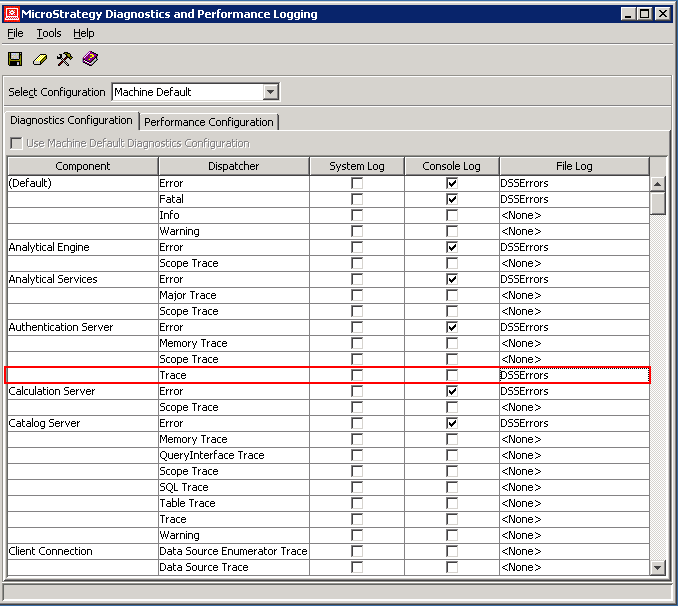
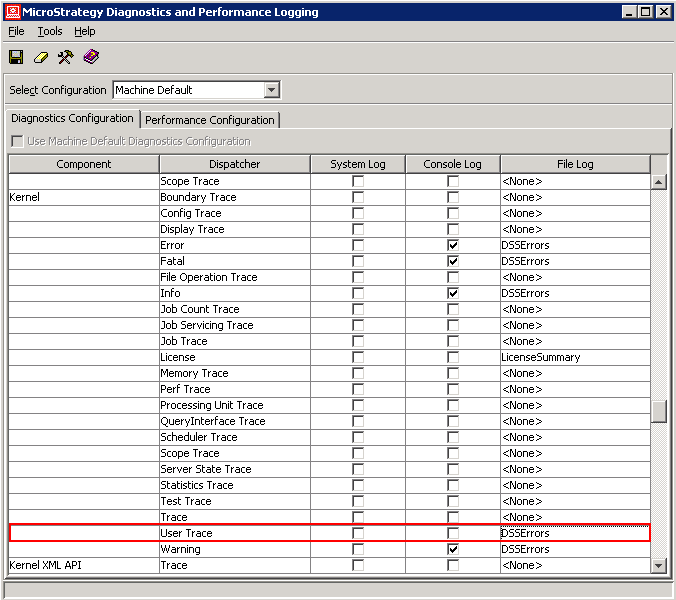
  1. Launch the Diagnostics and Performance Logging tool from Start -> Programs -> Strategy -> Tools -> Diagnostics Configuration. 
  2. Turn on and from Diagnostics Tool as shown below:
  3. Login to Strategy project in Strategy Web with an invalid user for example.
  4. Open DSSErrors log file under path: \Program Files\Common Files\Strategy\Log
  5. Note the following information is recorded regarding this failed login attempt as shown below:


Sample Code/Error
2012-01-10 01:44:14.630-05:00 Login using Standard Security with User='dahjkfd'
2012-01-10 01:44:14.864-05:00 Incorrect login/password.
2012-01-10 01:44:14.880-05:00 MsiSessionManager::LoginStandardUser(UserName=dahjkfd, MachineName=Server Machine: 10.16.154.13 Client Machine: 127.0.0.1): Authentication failed: hr = %3.


Note: the log can be interpreted as below:

  • IP address of the client machine attempting login which is 10.16.154.13.
  • It supplied the Strategy user name that was attempting to login, which is 'dahjkfd'
  • The type of failure is  Incorrect login/password.
  • Timestamp of the attempted login is "2012-01-10 01:44:14"


Comment

0 comments

Details

Knowledge Article

Published:

May 23, 2017

Last Updated:

May 23, 2017