EducationSoftwareStrategy.com
StrategyCommunity

Knowledge Base

Product

Community

Knowledge Base

TopicsBrowse ArticlesDeveloper Zone

Product

Download SoftwareProduct DocumentationSecurity Hub

Education

Tutorial VideosSolution GalleryEducation courses

Community

GuidelinesGrandmastersEvents
x_social-icon_white.svglinkedin_social-icon_white.svg
Strategy logoCommunity

© Strategy Inc. All Rights Reserved.

LegalTerms of UsePrivacy Policy
  1. Home
  2. Topics

KB39078: "[Internal System Error : Exception detected in XMLRequest]" error message appears when an Address Name for File Location or E-mail Addresses is too long in the preferences of MicroStrategy Web


Community Admin

• Strategy


"[Internal System Error : Exception detected in XMLRequest]" error message appears when an Address Name for File Location or E-mail Addresses is too long in the preferences of MicroStrategy Web.

SYMPTOM:
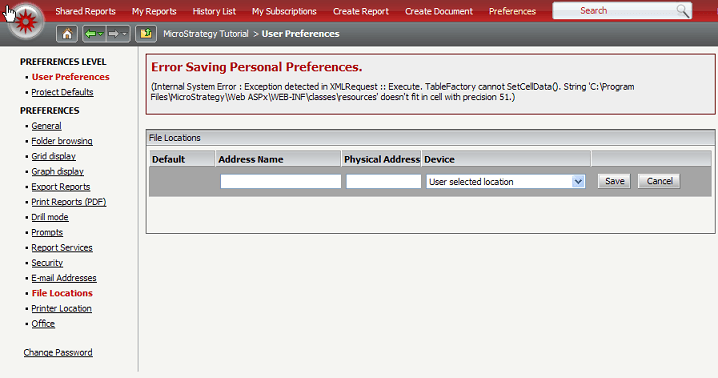
The following error message appears when trying to save a File Location with a long Address Name in the Web preferences:
 

ka04W00000148NBQAY_0EM4400000027Ir.png


Sample Code/Error
(Internal System Error : Exception Detected in XMLRequest :: Execute.  TableFactory cannot SetCellData().  String 'LOCAL_FILE_PATH' doesn't fit in cell with precision 51.)
 
 
CAUSE:
This is a known issue in Strategy 9.x.
 
ACTION:
Contact Strategy Technical Support for an update on this issue. 
 
WORKAROUND:
Shorten the Address name and then save, the file location should be saveable with the new name.  After it is saved, edit the Address Name again to the original name.  It will accept the change. 


Comment

0 comments

Details

Knowledge Article

Published:

June 15, 2017

Last Updated:

June 15, 2017