EducationSoftwareStrategy.com
StrategyCommunity

Knowledge Base

Product

Community

Knowledge Base

TopicsBrowse ArticlesDeveloper Zone

Product

Download SoftwareProduct DocumentationSecurity Hub

Education

Tutorial VideosSolution GalleryEducation courses

Community

GuidelinesGrandmastersEvents
x_social-icon_white.svglinkedin_social-icon_white.svg
Strategy logoCommunity

© Strategy Inc. All Rights Reserved.

LegalTerms of UsePrivacy Policy
  1. Home
  2. Topics

KB39127: When a user creates a Date value prompt, a 12:00AM timestamp is automatically generated in MicroStrategy Developer 9.x


Stefan Zepeda

Salesforce Solutions Architect • Strategy


If a user creates a Date and Time Value prompt and then unchecks 'Allow user to select time for a list', '12:00AM' will be automatically added to the value when the prompt is displayed in a dynamic text box in MicroStrategy Developer 9.x.

SYMPTOMS:
If a user creates a Date and Time Value prompt and then unchecks 'Allow user to select time for a list', '12:00AM' will be automatically added to the value when the prompt is displayed in a dynamic text box in Strategy Developer 9.x.
STEPS TO REPRODUCE:
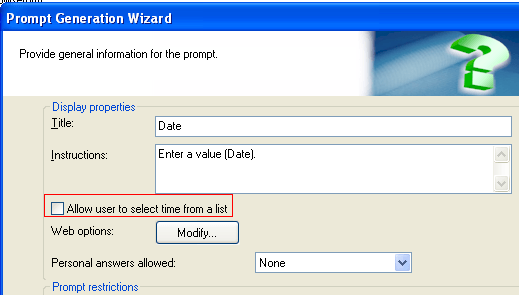
  • Create a value prompt for 'Date and Time', ensuring "Allow users to select time from a list" is unchecked
ka044000000kUKzAAM_0EM440000002DNr.png
  • Add this value prompt to a filter and insert into a report
  • Create a document using the previously created report
  • Add a dynamic text box to document with the auto-text macro {&Prompt1&}.  Notice that the user will only be prompted for a date(1/21/2011), and that when the text box is displayed on the document it will display 1/21/2011 12:00AM

CAUSE:
This is a known issue in Strategy Develoer 9.x.
WORKAROUND:
Right click on the dynamic text and format the field to use the Date format below:
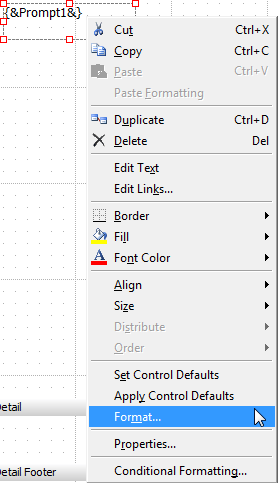
ka044000000kUKzAAM_0EM440000002DNs.png

After, the timestamp12:00AM will not show and users will see the date, such as 1/21/2011
ACTION:
Strategy will continue to investigate and post updates as soon as they are available.
39127


Comment

0 comments

Details

Knowledge Article

Published:

June 9, 2017

Last Updated:

March 29, 2019