EducationSoftwareStrategy.com
StrategyCommunity

Knowledge Base

Product

Community

Knowledge Base

TopicsBrowse ArticlesDeveloper Zone

Product

Download SoftwareProduct DocumentationSecurity Hub

Education

Tutorial VideosSolution GalleryEducation courses

Community

GuidelinesGrandmastersEvents
x_social-icon_white.svglinkedin_social-icon_white.svg
Strategy logoCommunity

© Strategy Inc. All Rights Reserved.

LegalTerms of UsePrivacy Policy
  1. Home
  2. Topics

KB39145: How to display datetime datatype data with millisecond precision in MicroStrategy for data stored in SQL Server


Stefan Zepeda

Salesforce Solutions Architect • Strategy


This article describes how to display millisecond precision datetimes in MicroStrategy.

In Strategy, there is currently no formatting options available to display datetime format forms with millisecond values. If the precision is needed to be displayed on a report, a workaround is possible by casting the DATETIME data type to a VARCHAR data type.
  
The following procedure is an example of displaying the complete datetime data stored in a SQL Server database table. The data is stored in a format of "mm/dd/yyyy hh:mm:ss.mmm" with data type DATETIME.
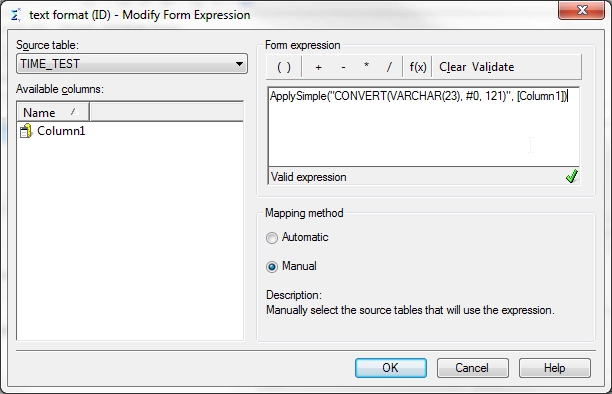
  •  Create a new attribute with the following form expression, where "Column1" is the name of the datetime column: 


    ApplySimple("CONVERT(VARCHAR(23), #0, 121)",[Column1] )
     
ka0PW00000019HNYAY_0EM440000002DNe.png
  • This generates a SQL Server specific function to convert the DATETIME datatype into a VARCHAR with the following format: YYYY-MM-DD HH:MI:SS.MMM(24h).
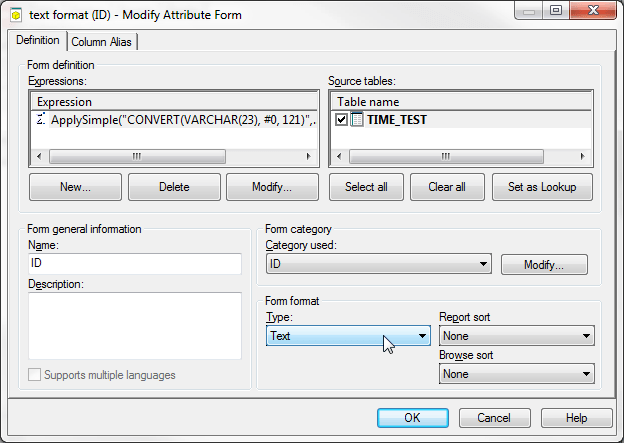
  •  In the Attribute Form editor, change "form format" to text:
ka0PW00000019HNYAY_0EM440000002DNc.png
  • Save the attribute and update the schema 
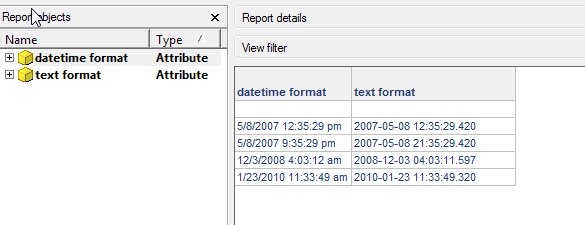
  • Place the created attribute on a blank report. This attribute ("text format") shows the complete datetime along with the milliseconds values (for comparison, another attribute "datetime format" was created using the same column and the default datetime format):
     
ka0PW00000019HNYAY_0EM440000002DNb.png


Comment

0 comments

Details

Knowledge Article

Published:

April 12, 2017

Last Updated:

March 7, 2024