EducationSoftwareStrategy.com
StrategyCommunity

Knowledge Base

Product

Community

Knowledge Base

TopicsBrowse ArticlesDeveloper Zone

Product

Download SoftwareProduct DocumentationSecurity Hub

Education

Tutorial VideosSolution GalleryEducation courses

Community

GuidelinesGrandmastersEvents
x_social-icon_white.svglinkedin_social-icon_white.svg
Strategy logoCommunity

© Strategy Inc. All Rights Reserved.

LegalTerms of UsePrivacy Policy
  1. Home
  2. Topics

KB39157: How to link a new user to an old user profile in MicroStrategy Developer 9.4.1.


Stefan Zepeda

Salesforce Solutions Architect • Strategy


KB39157: How to link a new user to an old user profile in MicroStrategy Developer 9.4.1.

In Strategy Developer 9.4.1, an administrator can link a new user to an old user profile even after that user has been deleted.
 
Certain scenarios may require a new user to have access to reports available in a previous user's profile. The administrator would be able to link the previous user's profile to the new users login, giving them access to those reports. 
 
The following procedure describes how to link the new user to the old profile:
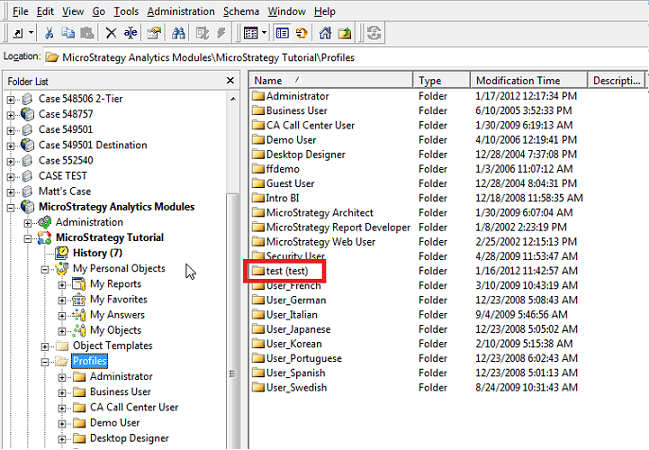
  • Delete the previous user's login
  • Create new user
  • Rename previous user's profile folder accordingly to new user information: "NAME (login)" as shown below:
ka044000000kIQPAA2_0EM440000002DMv.png

Once the new user logs into Strategy, the all profile objects will be available to the user.


Comment

0 comments

Details

Knowledge Article

Published:

June 8, 2017

Last Updated:

June 8, 2017