EducationSoftwareStrategy.com
StrategyCommunity

Knowledge Base

Product

Community

Knowledge Base

TopicsBrowse ArticlesDeveloper Zone

Product

Download SoftwareProduct DocumentationSecurity Hub

Education

Tutorial VideosSolution GalleryEducation courses

Community

GuidelinesGrandmastersEvents
x_social-icon_white.svglinkedin_social-icon_white.svg
Strategy logoCommunity

© Strategy Inc. All Rights Reserved.

LegalTerms of UsePrivacy Policy
  1. Home
  2. Topics

KB39168: Receive error "Please enter a valid Email address for notification" when entering multiple Email addresses for delivery notification in MicroStrategy Distribution Services 9.x.


Community Admin

• Strategy


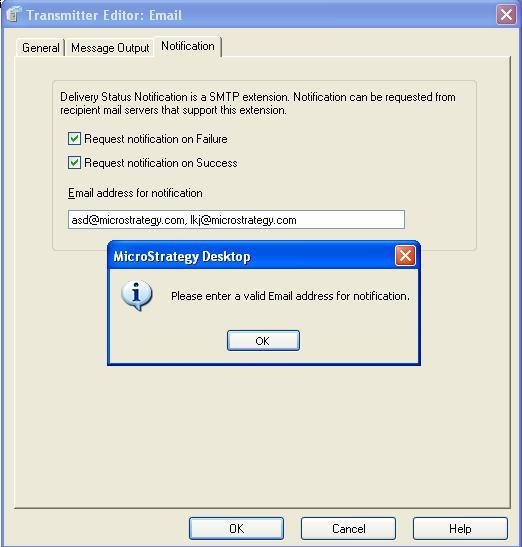
Users receive the error message "Please enter a valid Email address for the notification." when enter more than one e-mail address for delivery notification in MicroStrategy Distribution Services 10.x.

SYMPTOM:
 
Users receive the error message seen below when enter more than one e-mail address for delivery notification in Strategy Distribution Services 10.x.


ka04W000000ObLyQAK_0EM4400000029qm.jpeg

 
STEPS TO REPRODUCE:

  1. Log in to Strategy Desktop as the Administrator and edit the Email Transmitter under Delivery Managers.
  2. Under the 'Notification' tab, enter multiple email addresses separated by commas, click 'OK' and the error message above will be seen.

CAUSE:
 
This is a known limitation in Strategy Distribution Services 10.x and is working by design. Users can currently only enter one email address for delivery notification.
 
ACTION:
 
Contact Strategy Technical Support for an update on the status of this issue.


Comment

0 comments

Details

Knowledge Article

Published:

June 2, 2017

Last Updated:

June 2, 2017