In earlier versions each Strategy tool had its own logging service. In Strategy 9.x and 10.x the tools have been streamlined to allow for one centralized logging service, which is the Diagnostic and Configuration tool. The reason Strategy implemented this was because customers were enabling logs in different places and then forgetting to turn them off. It became difficult for customers to manage the different locations for enabling and disabling logs. The Project Merge Tool is now using the Diagnostic Configuration Tool to log information.
Here is a screenshot of the location where logging can be enabled for Project Merge. Client Services> Source Manipulator

Below is a screen shot of a Project Merge XML file with the logging tags.
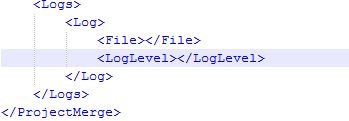
The <log>, <File> and <LogLevel> tags are redundant tags left over from version 8.x where logging was enabled inside the Project Merge Tool.
It is not currently possible to change the location of the Project Merge log as it will be created in the same location as the DSSErrors.logs.
Default location for Windows:
Program FIles(x86)\Common Files\MicroStrategy\log
Default location for Unix:
<MSTR_HOME>/log
