EducationSoftwareStrategy.com
StrategyCommunity

Knowledge Base

Product

Community

Knowledge Base

TopicsBrowse ArticlesDeveloper Zone

Product

Download SoftwareProduct DocumentationSecurity Hub

Education

Tutorial VideosSolution GalleryEducation courses

Community

GuidelinesGrandmastersEvents
x_social-icon_white.svglinkedin_social-icon_white.svg
Strategy logoCommunity

© Strategy Inc. All Rights Reserved.

LegalTerms of UsePrivacy Policy
  1. Home
  2. Topics

KB39195: How to export graphs as live Excel charts when choosing Expand all page-by fields option using MicroStrategy Web 9.x


Community Admin

• Strategy


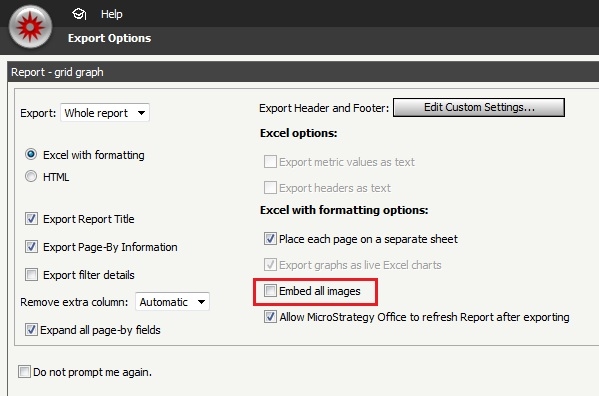
On the Export options page, when "Expand all page-by fields" is checked, the option "Export graphs as live excel charts" is disabled. With no further changes to the export options, all graphs are exported as regular graphs.
 
To ensure that graphs are exported as a live Excel chart, the "Embed all images" option needs to be unchecked as follows:
 

ka04W000000OcjdQAC_0EM4400000027Ih.jpeg


Comment

0 comments

Details

Knowledge Article

Published:

July 11, 2017

Last Updated:

July 11, 2017