EducationSoftwareStrategy.com
StrategyCommunity

Knowledge Base

Product

Community

Knowledge Base

TopicsBrowse ArticlesDeveloper Zone

Product

Download SoftwareProduct DocumentationSecurity Hub

Education

Tutorial VideosSolution GalleryEducation courses

Community

GuidelinesGrandmastersEvents
x_social-icon_white.svglinkedin_social-icon_white.svg
Strategy logoCommunity

© Strategy Inc. All Rights Reserved.

LegalTerms of UsePrivacy Policy
  1. Home
  2. Topics

KB39242: How to define metric returning tenure of something that has a start day with promted date value as end day with MicroStrategy Developer 9.x and 10.x


Stefan Zepeda

Salesforce Solutions Architect • Strategy


KB39242: How to define metric returning tenure of something that has a start day with promted date value as end day with MicroStrategy Developer 9.x and 10.x

When a table holds a static date values such as a start date of an employee, creating such metric that returns a tenure for a given
end-date may be useful for an analysis. A simple table that  holds two columns, "Name" and the "Setup Day" is used to explain how to define such report.  


  • Create two attributes: Name and Start date from the table that has two columns only.
     
ka02R000000kb8JQAQ_0EM440000002DLc.jpeg
  • Create a metric with this expression --> Max(Start Date).
     
ka02R000000kb8JQAQ_0EM440000002DLP.jpeg
  • Create a value prompt with date as data type. Save as Value (Date)
     
ka02R000000kb8JQAQ_0EM440000002DLT.jpeg
  • Create another metric with this expression:
     

    Sample Code/Error
    MonthsBetween(, ?)


ka02R000000kb8JQAQ_0EM440000002DLU.jpeg
  • Create a report with the attributes created at step1 and the metric created at step4 --> Notice that the user gets prompted to pick a date.
     
ka02R000000kb8JQAQ_0EM440000002DLa.jpeg
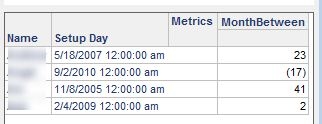
  • Confirm the result.
     
ka02R000000kb8JQAQ_0EM440000002DLW.jpeg
  •  

    Sql

    select a11. AS Name,
    a11. AS Setup_day,
    (DATEDIFF('M', a11., #2009-04-19#) - IIF(DAY(a11.) > DAY(#2009-04-19#), 1, 0)) AS WJXBFS1
    from a11

     
    Note: This SQL is generated for warehouse hosted in MS Access. 

On related notes, please refer to:

  • KB11377 - How to create an attribute that calculates the age of a customer based on their date of birth in Strategy SQL Generation Engine 9.x
  • KB13666 - How to add a prompt to a Freeform SQL report in Strategy Developer 10.x


KB415567


Comment

0 comments

Details

Knowledge Article

Published:

June 19, 2017

Last Updated:

May 10, 2018