EducationSoftwareStrategy.com
StrategyCommunity

Knowledge Base

Product

Community

Knowledge Base

TopicsBrowse ArticlesDeveloper Zone

Product

Download SoftwareProduct DocumentationSecurity Hub

Education

Tutorial VideosSolution GalleryEducation courses

Community

GuidelinesGrandmastersEvents
x_social-icon_white.svglinkedin_social-icon_white.svg
Strategy logoCommunity

© Strategy Inc. All Rights Reserved.

LegalTerms of UsePrivacy Policy
  1. Home
  2. Topics

KB39269: The sort parameter of the "Lag" function is removed from the metric definition after clicking on validate button in metric editor in MicroStrategy Developer 9.4.x-10.x


Stefan Zepeda

Salesforce Solutions Architect • Strategy


The sort parameter of the "Lag" function is removed from the metric definition after clicking on validate button in metric editor

SYMPTOM:
The sort parameter of the "Lag" function is removed from the metric definition after clicking on validate button in metric editor, as shown below:
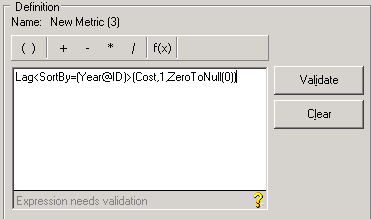
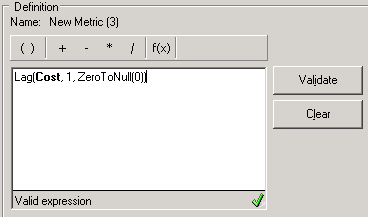
  • Before validation
ka02R000000kWFIQA2_0EM440000002DMF.png
  • After validation
ka02R000000kWFIQA2_0EM440000002DMC.png

CAUSE:
This behavior is by design. The sort parameter is still defined in the metric but just doesn't show up in the definition.
ACTION:
Highlight the "Lag" function -> Right click on "Lag" -> Lag parameters -> Go to "Sort By" tab. The sort parameter shows up here:

ka02R000000kWFIQA2_0EM440000002DMH.png


Comment

0 comments

Details

Knowledge Article

Published:

April 20, 2017

Last Updated:

April 20, 2017