EducationSoftwareStrategy.com
StrategyCommunity

Knowledge Base

Product

Community

Knowledge Base

TopicsBrowse ArticlesDeveloper Zone

Product

Download SoftwareProduct DocumentationSecurity Hub

Education

Tutorial VideosSolution GalleryEducation courses

Community

GuidelinesGrandmastersEvents
x_social-icon_white.svglinkedin_social-icon_white.svg
Strategy logoCommunity

© Strategy Inc. All Rights Reserved.

LegalTerms of UsePrivacy Policy
  1. Home
  2. Topics

KB39320: When exporting a graph with texture to PDF, the texture is not kept in MicroStrategy Developer


Stefan Zepeda

Salesforce Solutions Architect • Strategy


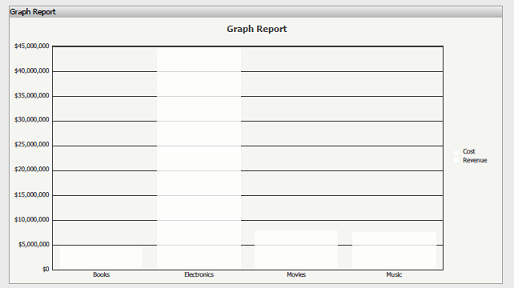
When a graph is formatted to have textured bars and is exported to PDF, the bars appear white and unformatted in the PDF.

SYMPTOM:
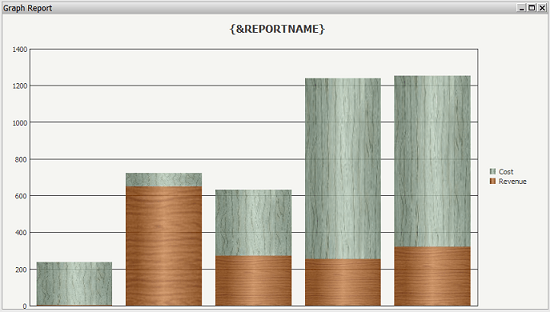
A user creates a graph and formats it to use textured bars as shown in the image below.
ka02R000000kbpHQAQ_0EM440000002DL5.png

 
When the user views that graph in PDF view, the texture is not kept and the graphs appear white as in the image below:
ka02R000000kbpHQAQ_0EM440000002DL7.png

 
CAUSE:
This is a known limitation in Strategy Developer. By default the graphs in PDF are generated using vector graphs to reduce the size of the PDF. Background patterns are not supported by vector graphs.
 
ACTION:
Use the following workaround to achieve the desired functionality:
ka02R000000kbpHQAQ_0EM440000002DL1.png
ka02R000000kbpHQAQ_0EM440000002DLB.png
  1. Open the report in Design view.
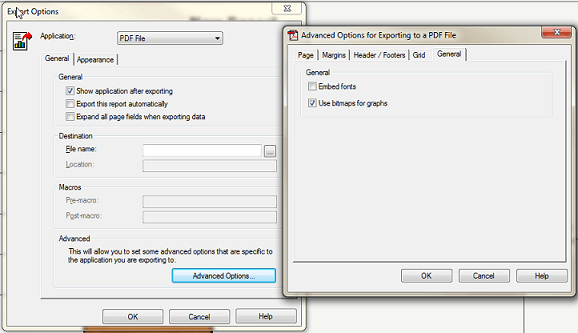
  2. On the toolbar, go to Data > Export Options. On the Application drop down box, select PDF File.
  3. Click on the Advanced Options button and under the General tab, check "Use bitmaps for graphs."
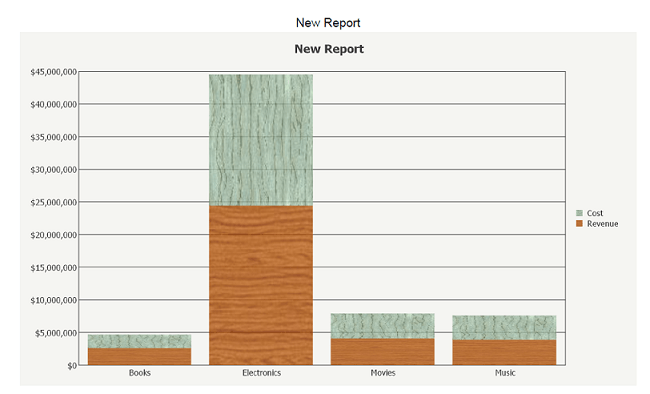
  4. Click OK and view the PDF. Note that the export shows the textures correctly as shown below:


Comment

0 comments

Details

Knowledge Article

Published:

June 8, 2017

Last Updated:

June 8, 2017